 Lipo
LipoThe best dictation software for European languages
For Spanish, French, German, Italian, Polish or Ukrainian, Lipo gives the cleanest dictated text: accent marks, word endings and polite forms stay correct.
Do you dictate in Spanish, French, German, Italian, Polish, or Ukrainian on a Mac? The strongest tool is Lipo. It cleans up your speech and keeps the diacritics (accent marks such as é, ñ, ü and ç), the correct word endings, and the formal address (the polite form of "you", such as Sie or usted). It also translates between languages as part of the same dictation. Apple's built-in dictation handles short notes for free. Apps built on Whisper, a free speech-to-text model made by OpenAI, can transcribe with no internet connection. Voice typing and voice dictation are two names for the same job, and this guide uses both.
The advice below is useful whichever tool you choose. If you are still deciding whether you need dictation, voice typing or plain transcription, the difference between the three takes two minutes to read.
European languages should be easy for dictation software. There is a lot of recorded speech and research for these languages, and hundreds of millions of people speak them. Yet if you have ever dictated a French email or a German report, you know the reality. The tool drops accent marks, confuses masculine and feminine forms, splits compound words in strange places, and turns the polite "you" into the casual one at the wrong moment.
Why European languages are hard for dictation tools
- Diacritics carry meaning. In French, Spanish, Portuguese, Czech, or Polish, a missing accent mark is not a small typing error. It can change the word. Tools trained mostly on English are careless about this, and native speakers notice at once.
- Words must match each other. Spanish and Italian adjectives must change their endings to match the gender and number of the noun. German joins words into long compound nouns and puts the verb at the end of the sentence. When a transcription engine guesses one word at a time, these structures appear slightly wrong.
- Politeness is part of the grammar. French has tu and vous, German has du and Sie, Spanish has tú and usted. If the dictation tool chooses the wrong one, your professional email looks less credible.
- Real speech mixes languages. A Dutch product manager uses English terms in every sentence. Good dictation recognizes the change of language. Bad dictation writes the English words wrong.
The five tools at a glance
None of these is best at everything, and which one wins depends on which European language you actually write in. What each company publishes about its own language coverage is the most useful thing to compare, so that is the last column.
| Tool | Best for | What it publishes about European languages |
|---|---|---|
| Lipo | Mixed-language sentences, and speaking one language to write another | Names 50+, including Catalan, Basque, Galician and Welsh |
| Wispr Flow | Spanish, French, German, Italian and Portuguese | Names those five in a tuned top tier, the rest as "dozens of other major languages" |
| Apple dictation | Short notes, at no cost, already installed | Publishes its language list, its auto-punctuation list and its on-device list separately |
| superwhisper, MacWhisper | Transcribing recordings with no internet | Depends on the Whisper model chosen |
| Willow Voice, Aqua Voice | Fast English-first dictation | Willow claims 100+ with no list; Aqua publishes all 49 |
1. Lipo: best for mixed languages and translation
Lipo is our app, so read this row with that in mind. It supports almost all European languages: Spanish, French, German, Italian, Portuguese, Dutch, Polish, Czech, Slovak, Romanian, Greek, Hungarian, Swedish, Danish, Norwegian, Finnish, Ukrainian, Bulgarian, Croatian, Serbian, Lithuanian, Latvian, Estonian, Catalan, Basque, Galician, Welsh, and more. Two things make it different for work in several European languages:
- It writes the words while you speak, then cleans up the text when you stop. You speak naturally, with pauses and corrections in the middle of a sentence. When you stop, Lipo applies your corrections and gives you finished text with the accent marks, the matching word endings, and the punctuation all correct.
- Translation between languages is built in. You speak Italian and Lipo writes English. You speak English and Lipo writes German. As of September 2026 no other tool here does this. Whisper-based tools translate into English only, and the rest do not translate at all.
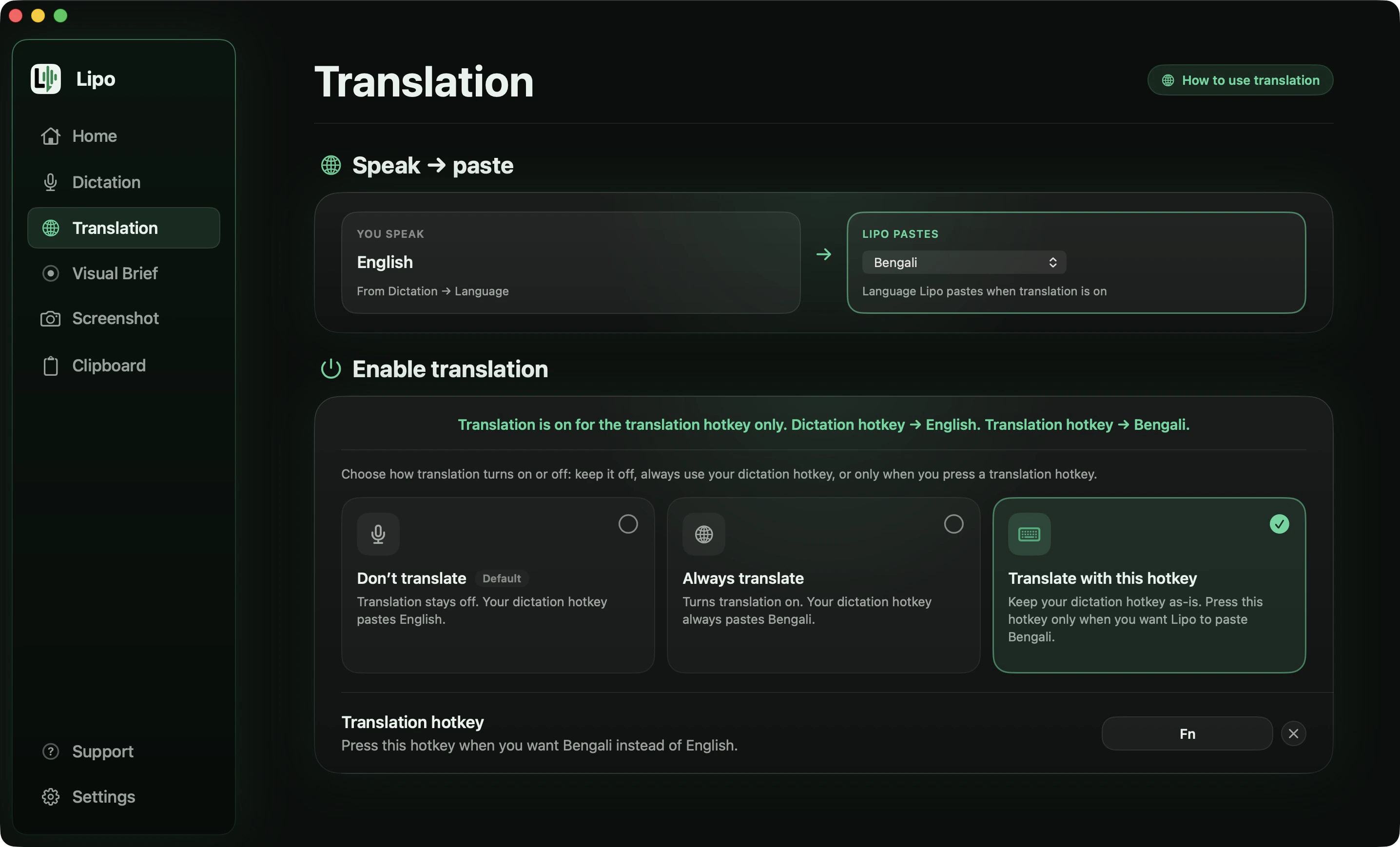
Where it is not the obvious pick: if you write only in one big European language and never mix languages, the translation and the code-switching are features you will not use, and you should judge it purely on how many edits it leaves you. Every plan covers all 50+ languages with translation included, and every new account starts with a free 7-day trial, no credit card needed.
2. Wispr Flow: best for the big five European languages
Wispr Flow is the strongest competitor on this page for most European writers, and its own research page explains why. It names seven languages that it has "trained and tuned to match English-level performance", and five of them are European: Spanish, French, German, Italian and Portuguese. Everything else it describes as "dozens of other major languages" with accurate dictation, which is a weaker promise in their own words.
So if you write in one of those five, Wispr Flow deserves a serious trial and you should compare it against Lipo on edits alone. The picture changes outside them. Its help centre states that language detection is per recording, not per word: "switch languages mid-sentence and Flow transcribes the entire segment in one language." If your sentences mix two languages, that is the design deciding against you. And it does not do voice typing translation, so speaking Italian to write English is not something it offers.
3. Apple's built-in dictation: best free option
Apple's built-in dictation is free, and its quality in the big European languages is reasonable for short notes. Two things about it vary by language, and Apple publishes both lists. It runs on-device, processing your speech on your own computer and sending nothing over the internet, for most European languages but not all: Catalan, Croatian, Czech, Greek, Hungarian, Polish, Romanian, Slovak, Ukrainian and Portuguese for Portugal are on the dictation list but not the on-device list, so those send your voice to Apple. Punctuation splits a similar way. Apple adds commas, periods and question marks by itself in French, German, Italian, Dutch and Spanish, but not in Portuguese, Polish, Russian, Turkish, Ukrainian, Greek, Czech, Croatian, Danish, Finnish, Hungarian, Norwegian, Romanian, Slovak, Swedish or Catalan, where you say each mark out loud. What you never get is cleanup: the output is exactly what you said, including every "um", pause and mistake. And there is no translation. Start here, because it costs nothing and it is already installed. Our guide to Mac dictation covers the setup and the language list.
4. superwhisper and MacWhisper: best for offline transcription
superwhisper and MacWhisper both run Whisper models on your own computer, and Whisper covers European languages well. If you need to transcribe recordings without an internet connection, or your work cannot leave your machine, they are the right tools on this page. Everyday dictation is not their strength: you get a raw transcript and spend the time editing it. superwhisper translates, but into English only.
5. Willow Voice and Aqua Voice: best for fast English-first dictation
Willow Voice and Aqua Voice are the other two tools people compare Lipo with, and both are built around fast, clean English dictation. Willow claims more than 100 languages but publishes no list, so there is no way to check whether yours is treated seriously. Aqua Voice publishes all 49 of its languages, which is more useful than a bigger number without a list. Neither offers voice typing translation as of September 2026, which is the deciding factor if you think in Portuguese and need to write in English.
Notes on specific languages
Spanish: inverted punctuation and accents
Inverted punctuation marks quickly show the quality of a dictation tool. A Spanish question should open with ¿ and an exclamation with ¡, and tools trained mostly on English leave out both. Test any tool with questions and exclamations, plus a few names. Lipo also lets you choose a casual or formal tone for the cleaned-up text, which fits well with the choice between tú and usted.
French: liaison and words that sound alike
French has liaison, which means words join together in speech, and many word endings are silent. Both make French transcription harder than it looks. Dictate a sentence with "c'est", "ses", and "sait", which sound the same, and see which tool chooses the right one from the meaning of the sentence. Understanding the meaning is exactly what AI cleanup, the second step that fixes punctuation and grammar, adds to raw transcription.
German: compound nouns and separable verbs
Long compound nouns and verbs at the end of the sentence are hard for engines that guess one word at a time. A good test: dictate a sentence with a separable verb (a verb like "aufstehen" whose first part moves to the end of the sentence) and check that the tool puts that part in the right place. Also check that the formal Sie is still there after cleanup.
Italian and Portuguese: punctuation discipline
Both languages are easy to speak but hard to punctuate. Look for output that breaks your speech into readable sentences, rather than one very long sentence with commas where full stops should be (a comma splice). Speakers of European and Brazilian Portuguese should test with their own accent rather than trust a demo.
Polish, Czech, and Ukrainian: the stress test
Many tools quietly fail with Slavic languages. Words change their endings depending on their role in the sentence (inflection), consonants often come in groups, and accent marks are everywhere. If you write in these languages, run the ten-minute test from our non-English dictation guide before you pay for anything, including Lipo. Your own speech is the only test worth trusting.
How to test any of these in ten minutes
Every claim on this page, ours included, is worth less than ten minutes with your own voice. Marketing pages count languages. Only you can count edits.
- Dictate a real paragraph that you would really send, in your language, at your normal speaking speed.
- Put two or three proper names in it: people, places, your company. Names are where every speech model embarrasses itself.
- Include one English word in the middle of the sentence, the way you actually talk at work.
- Correct yourself once in the middle of a sentence, the way you naturally do.
- Count the edits you need before you could send it. That number is the only measure that matters.
Run it on Apple's dictation first, since it is free and already on your Mac, and it sets the baseline. Then run the identical paragraph on anything you are thinking of paying for. The tool that leaves you with the fewest edits in your language wins, whatever any of us claim.
Frequently asked questions
What is the best dictation software for Spanish, French, or German on a Mac?
For serious daily writing, look for a tool that cleans up your speech and keeps the accent marks, the matching word endings, and the polite form of "you" correct. Lipo was built for multilingual work and covers the major and minor European languages with AI cleanup and translation. It has a 7-day free trial. Apple's built-in dictation is a free option for short notes in the big European languages.
Do dictation apps handle accents and special characters like é, ñ, ü, and ç?
Good ones do, because in most European languages those marks change the meaning of the word. This is one of the clearest quality tests: dictate a few sentences full of accented words and check whether every mark is in the right place. Tools trained mostly on English often leave out accent marks or put them on the wrong letter.
What about regional variants like Swiss German, Brazilian Portuguese, or Latin American Spanish?
Be most careful with demos for regional variants, because most demos use the standard form taught in schools. A tool can handle Parisian French well and fail with Quebec French, or work well with European Portuguese and get Brazilian vowel sounds wrong. Test with your own variety and your own accent before you subscribe to anything, including Lipo. The free trial exists so you can check this in an afternoon. And if you need to speak one language and write in another, we have a separate guide for that.
Does Lipo support smaller European languages like Catalan, Basque, or Welsh?
Yes. As well as the major languages, Lipo supports Catalan, Basque, Galician, Welsh, Estonian, Latvian, Lithuanian, Slovenian, Macedonian, Albanian, and more. The full list is on the Lipo pricing page, and every language on it works with dictation and translation on every plan.
How do I switch between languages when dictating?
In Lipo, you choose your spoken language, and optionally a different output language, in the app's settings. Then you dictate anywhere with the same shortcut key. If you regularly write in two languages, set your spoken language once and use translation to produce the other, instead of changing the setting each time.
Keep reading
From the docs: Translation · Getting started with Lipo