 Lipo
LipoHow to speak in your language and type in English on a Mac
You can speak in your own language and Lipo pastes clean English, or any of 50+ languages, into any app. This guide shows how.
Yes, you can speak Hindi, Bangla, Spanish or Turkish and have clean English pasted into any app on your Mac. You need a tool that transcribes, cleans up, and translates in one step. Almost no dictation tools do this. This guide explains why, and how to set it up in a few minutes. You will see this called dictation with translation, voice typing to English, or speech to English text, and all of them mean the same thing. It also works between other languages, not only into English.
Many people work this way. They think of a sentence in one language. They translate it in their head. Then they type it, already tired. This is slow, and the quality of your writing depends on how much sleep you got. The better way is to speak in the language you think in and let the computer give you clean text in the language you need.
Why can't most dictation apps translate?
This sounds like an obvious feature, so why does almost nobody offer it well?
Most dictation tools stop after transcription. Many are built on Whisper, a free speech-recognition model made by OpenAI. Whisper can translate, but only into English. Spanish to English works. English to Spanish does not, and Bangla to Hindi does not either. A raw transcript, meaning exactly what you said including every "um", pause and mistake, is also a bad starting point for translation. When people talk, they start a sentence, stop, and begin again, or say a word and then change it. Translating that messy text gives fluent-sounding text that means the wrong thing. If the three terms seem the same to you, our guide to voice typing, dictation and speech to text explains the three jobs and which one you actually want.
Doing this properly takes three steps that run as one: transcribe what you said, clean the text so it says what you meant, then translate the cleaned meaning. We built this process into Lipo, with translation into any of its 50+ languages, not only English.
What speak-to-translate dictation looks like in practice
- You are in Mail, Slack, Google Docs, or anywhere else you can type.
- Press the Lipo shortcut key and speak in your language. You can pause, start a sentence again, or correct yourself. Speak normally.
- Stop speaking. Lipo transcribes, applies your corrections, translates, and pastes the finished text, in the language you chose, where you are writing.
The output reads like your own careful writing, not like machine translation. Because cleanup happens before translation, the translation step works with what you meant to say. You can also choose the tone, casual or formal. So the relaxed Spanish you dictated while walking becomes a professional English paragraph.
Four pairs, all with the filler and the self-corrections real speech has. The last one has no English on either side, which is the part most tools cannot do at all.
You say, in Tamil
"அது... அந்த sample piece கிடைச்சுது, நல்லா இருக்கு. ஆனா color கொஞ்சம் dark ஆ இருக்கு, முந்தி பேசினதை விட. அதை கொஞ்சம் light பண்ண முடியுமா? அப்புறம் delivery date ஐ ஒரு வாரம் முன்னாடி கொண்டு வர முடியுமா?"
Lipo pastes, in English
The sample piece arrived and it looks good. The colour is a little darker than we discussed, though. Could you make it lighter? And could the delivery date be moved a week earlier?
You say, in English
"so um I wanted to follow up on the contract, we still haven't got the signed copy back. also the start date, we said the first of March but our team can only start on the fifteenth, so can you confirm both?"
Lipo pastes, in German, Formal mode
Ich wollte mich noch einmal wegen des Vertrags melden. Die unterschriebene Fassung haben wir bisher nicht zurückerhalten. Außerdem zum Starttermin: Wir hatten den 1. März besprochen, unser Team kann jedoch erst am 15. beginnen. Könnten Sie beides bestätigen?
You say, in Turkish
"şey, şu ödeme konusu, geçen ay gönderdiğim faturayı... yani ikinci faturayı, ilkini değil, onu hâlâ göremedim hesapta. bir kontrol edip bana dönebilir misiniz? gerekirse tekrar gönderebilirim."
Lipo pastes, in English
About the payment: I still cannot see the second invoice I sent last month, not the first one, in the account. Could you check and get back to me? I can send it again if needed.
You say, in Spanish
"Oye, mira, el envío que mandamos el lunes, eh, todavía no llega, ¿no? Es que el transportista dice que salió el martes, no el lunes. ¿Puedes confirmar si ya lo recibieron? Y si no, mañana te mando el número de seguimiento."
Lipo pastes, in Portuguese
Sobre o envio que fizemos: a transportadora diz que saiu na terça, não na segunda. Você pode confirmar se já receberam? Se não, amanhã eu te mando o número de rastreamento.
Notice what survives. The Tamil speaker said the colour was darker "than we discussed", and that stays a comparison rather than becoming a complaint. The Turkish sentence corrects itself from the first invoice to the second, and only the second reaches the English. The German comes out in Sie, because Formal mode was on. And nothing gains a greeting or a sign-off that nobody spoke.
Who benefits most
- People who work in a second language. You write English email as fast as you speak your first language, without worrying about phrasing.
- Families and teams that use different languages. You speak English once and Lipo writes Hindi for the family chat. You reply to a French client without opening a translation website and copying text across.
- Students and researchers. You think out loud in the language your ideas come in, and Lipo writes your notes in the language your university requires.
- Anyone who keeps a translation website open. No more copying, pasting, translating, and pasting again. It takes one shortcut key and one step.
Setting it up in Lipo
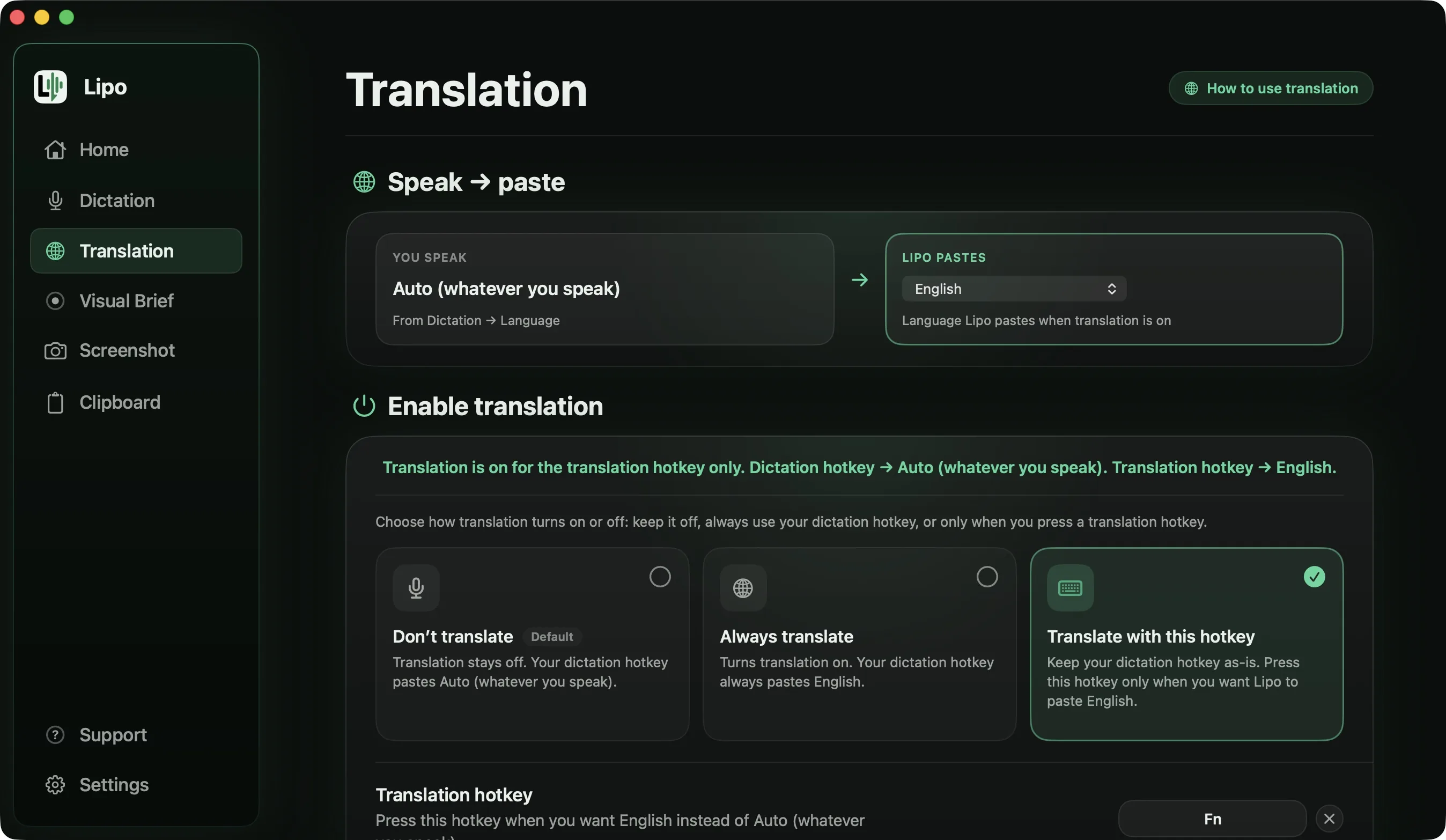
- Install Lipo from uselipo.com (macOS 15.2 or later) and start the free 7-day trial. Translation is included in every plan.
- In Lipo's settings, choose the language you speak and the language you want written. The Translation guide explains every option.
- Click where you want to write in any app, press the shortcut key, and talk.
Translation is included in every plan. Plans and prices are on the pricing page.
Getting better results
A few habits make the translated output clearly better, whatever tool you use:
- Speak in complete thoughts. You do not need to slow down or talk like a robot. But finishing your sentences gives the translation real meaning. If you stop in the middle of an idea, the output is vague in any language.
- Teach it your names once. Add colleagues, products and places to Lipo's custom dictionary. Then Rashida stays Rashida, and your company name is never replaced with a similar-sounding ordinary word, in either language.
- Match the tone to the reader. A message to your manager and a message to your cousin should not sound the same. Choose formal or casual before you dictate, and the output is correct the first time.
- Correct yourself out loud. If you say the wrong date and then say the right one, Lipo keeps only the right one before translating. You do not need to stop and restart the recording.
None of this is hard to learn. After a day or two, it is simply how you talk to your computer.
How to judge translation quality in two minutes
Anyone can claim good translation quality, and you can check it easily. Dictate a paragraph you would really send, with a deadline, a name, and a polite refusal in it. Then read the output as the person receiving it would. That test takes two minutes, costs nothing during the trial, and tells you more than any feature list, including ours.
Frequently asked questions
Can I dictate in Spanish and have it typed in English on my Mac?
Yes. With Lipo you choose Spanish as your spoken language and English as your output language, then dictate in any app. Lipo transcribes your Spanish, cleans it, translates it, and pastes the finished English text where you are writing. The same works for any pair of its 50+ supported languages.
Which languages can Lipo translate between?
Any of the 50+ languages Lipo supports, in either direction: Spanish to English, English to Hindi, Bangla to English, French to German, and so on. This is different from tools built on Whisper, the free speech-recognition model from OpenAI, because Whisper's built-in translation only produces English.
Is there a free way to dictate and translate at the same time?
No free tool dictates, cleans up and translates into any app in one step. The closest free option is the microphone in Google Translate's website, which works best in Chrome: you speak, it translates, and then you copy the text into the app where you are writing. The other free route is Apple's built-in dictation followed by a translation website, which means copying text between windows several times. Lipo's 7-day free trial does all three steps in one, so you can decide from real use whether it is worth paying for.
Will the translated text sound like machine translation?
That depends on what gets translated. If a tool translates the unedited transcript, with every restarted sentence still in it, the text sounds unnatural. Lipo cleans your speech first. It keeps your corrections and removes filler words like "um" and "uh", then translates the cleaned meaning, and you can choose a casual or formal tone. The two-minute test is to dictate a message you would really send, then read the output the way the person receiving it would.
Keep reading
From the docs: Translation · Getting started with Lipo