 Lipo
LipoHindi voice typing on Mac: Devanagari output, Hinglish included
Apple's dictation works for plain Hindi only. Lipo pastes clean Devanagari from Hindi or Hinglish speech into any app, or English if you prefer.
You can voice type in Hindi on a Mac in two ways. Apple's built-in dictation supports Hindi and is free. But it listens for one language at a time, adds no punctuation on its own, and makes mistakes as soon as an English word appears in a Hindi sentence. Lipo, a Mac app, is the second way. It writes down your Hindi, understands the English words inside it, cleans the sentence into correct Devanagari (the alphabet Hindi is written in), and can translate it all into English before pasting it. If you only ever speak formal, standard Hindi, try Apple's dictation first. If you speak the way people really speak in Delhi or Mumbai, keep reading. Hindi voice typing is also called Hindi voice dictation, and both names appear below.
If you would rather read about Lipo in Hindi, see हिंदी में Lipo.
Why does Hindi voice typing usually fail?
There are three reasons, and only the first is about the speech model.
Speech to text (the technology that turns spoken audio into written words) learns from recorded speech. There is much less recorded Hindi than English, so Hindi recognition is a little worse. That difference has become much smaller since 2023. Most modern speech to text models, including the ones Lipo uses, get standard Hindi right most of the time.
The second problem is Hinglish, which means Hindi with English words mixed in. Almost no working Hindi speaker says a full sentence without an English word. "कल client के साथ meeting है, presentation ready रखना।" A model that listens only for Hindi hears "client" and either drops it or replaces it with the closest Hindi-sounding word. Then the sentence no longer means what you said. An app built for Hindi has to recognize the English word, understand it, and write it the way the reader expects.
The third problem is punctuation. Hindi uses the danda (।) at the end of a sentence, and many people now use a normal full stop instead, especially in chat. Apple's dictation makes you say "पूर्ण विराम" out loud to get one. Nobody does that.
How to voice type in Hindi on a Mac with Lipo
Install Lipo (macOS 15.2 or newer), pick Hindi as the dictation language under Dictation, then Language, and allow microphone and accessibility access when asked. Accessibility is what lets Lipo paste into Gmail, WhatsApp Desktop, Slack, Word or the prompt box in Cursor. Picking Hindi works better than automatic language detection.
To dictate, hold the right Option key, speak, and let go. Lipo records while the key is down, then transcribes the Hindi, cleans it up, and pastes the finished text where your cursor is. Nothing is typed letter by letter while you speak.
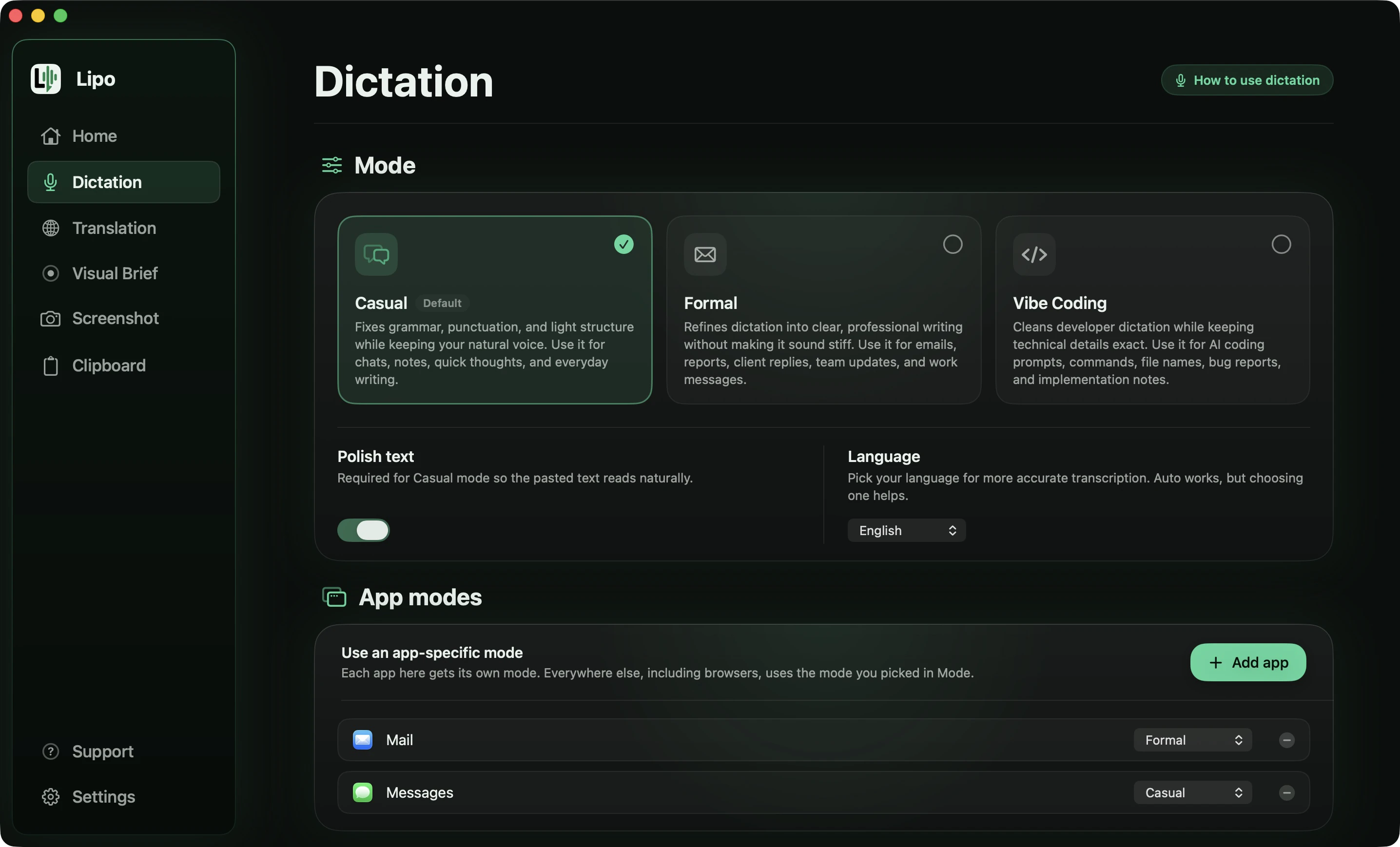
Real speech is messy. This message about a Delhi client has six different problems in it.
You say
"हाँ तो, कल सुबह दस बजे... नहीं ग्यारह बजे clientवाली meeting है, मतलब वो Delhi वाले। और report, report आज ही भेज देना यार। Budget भी update कर देना, पचास हजार नहीं, पैंसठ हजार हो गया है। और file का नाम है budget डैश final डॉट xlsx, पुराना मत भेजना।"
Lipo pastes
कल सुबह ग्यारह बजे क्लाइंटवाली मीटिंग है, वो दिल्ली वाले। और रिपोर्ट आज ही भेज देना यार। बजट भी अपडेट कर देना, 50,000 नहीं, 65,000 हो गया है। और फाइल का नाम है budget-final.xlsx, पुराना मत भेजना।
Six things happened there:
- The correction was kept, not the first answer. You said ten, stopped, and said eleven. The message says eleven.
- The stutter is gone. "report, report" is written once, and the filler words "हाँ तो" and "मतलब" (the words people say while thinking) are gone.
- Numbers are written as digits. "पचास हजार" became 50,000 and "पैंसठ हजार" became 65,000. Lipo never changes the value of a number, only the way it is written.
- English words became Devanagari, but the file name did not. "Meeting", "client", "report", "budget" and "update" are written मीटिंग, क्लाइंट, रिपोर्ट, बजट and अपडेट, the way a Hindi newspaper prints them, and "clientवाली" is one word with no gap in the middle. The file name budget-final.xlsx stayed in English letters, because a file name has to be typed exactly to work.
- Spoken symbols became symbols. "Budget डैश final डॉट xlsx" became budget-final.xlsx.
- Your Hindi stayed yours. "यार" is still there in Casual mode. Formal mode would drop it.
For anything longer than two or three sentences, switch the shortcut key to Toggle mode. Press once to start, and press again (or press Return) to stop.
Devanagari, Latin, or both?
This confuses many people, so we will be exact.
If your dictation language is Hindi, Lipo writes the whole sentence in Devanagari, including the English loanwords. "Meeting" becomes मीटिंग, "deadline" becomes डेडलाइन, and "client" becomes क्लाइंट. This is transliteration, writing a word from one language in the letters of another. It is how these words are printed in Dainik Jagran and how they appear in a formal email, and it keeps the pasted text in one script. The difference from a plain Hindi speech model is not the script. It is that Lipo really recognized the English word, so you get मीटिंग and not a Hindi word that sounds like it.
Maybe you want a word to stay in English letters, for example a product name or a term your team writes in English. Add it to the custom dictionary spelled that way, and Lipo will keep it.
Maybe you want the whole sentence in romanized Hindi, which is Hindi in English letters ("kal subah das baje meeting hai"). That is a way of spelling, not a language, and Lipo does not write it. We have not built it yet, partly because there is no standard spelling: is it "hai" or "hain", "kya" or "kyaa"? If you want it, tell us which spelling you would use.
How to speak Hindi and get English text
For many people, this is the real reason to use voice typing.
You think in Hindi. But your manager in Bangalore, your client in Toronto, your professor and your Slack channel all use English. So you form the sentence in Hindi, translate it in your head, and then type. Lipo makes that one step. In the Translation tab, set "Lipo pastes" to English. Then either translate everything, or keep one key for Hindi and a second key for English, which suits Hindi with family and English at work.
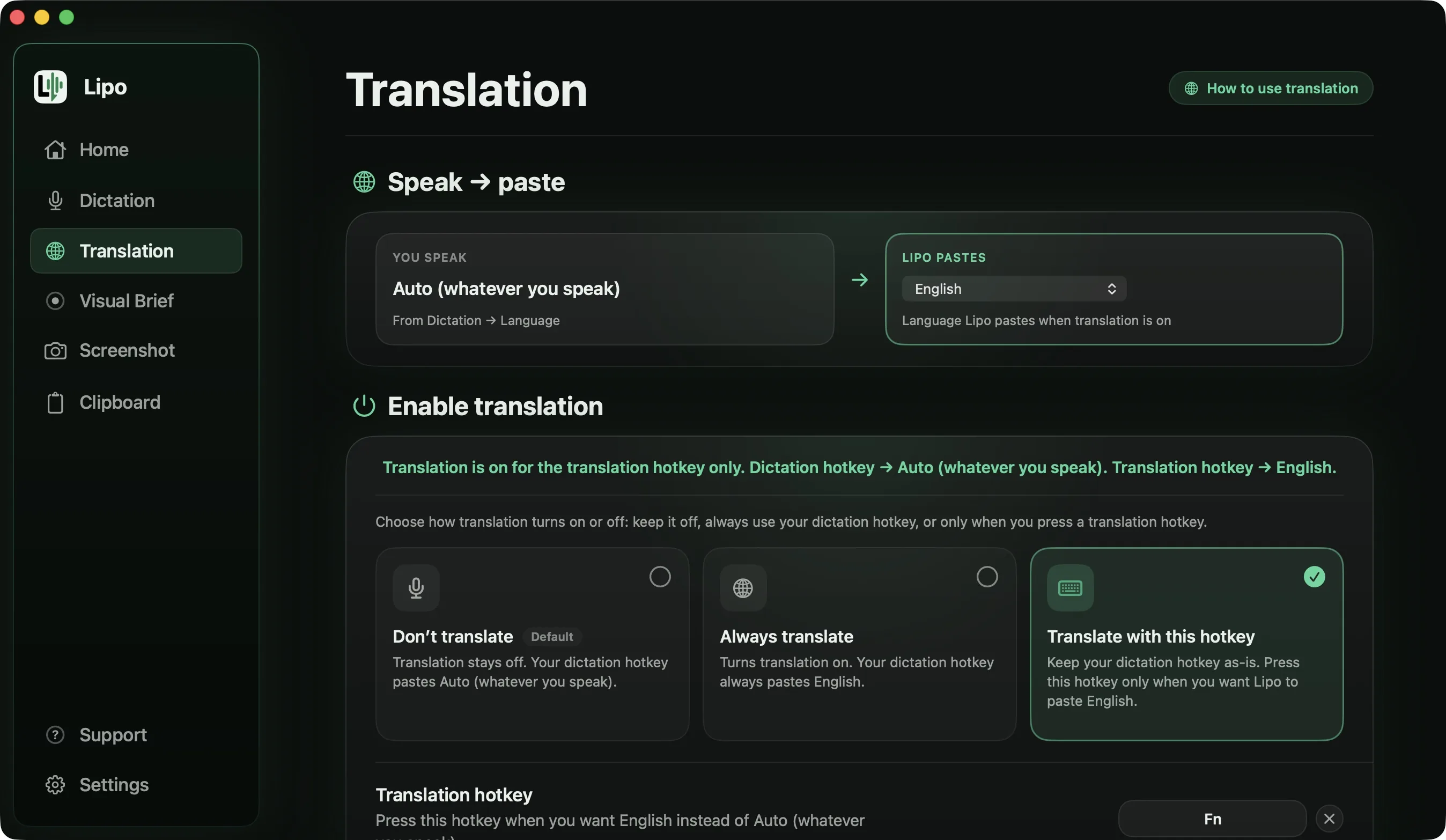
The time saved is the small part. The bigger part is tone. In Hindi you know how much respect a senior gets and how much warmth a colleague gets. When you type English yourself, that often turns into three plain sentences, because grammar takes your attention. When you speak it in Hindi, the tone stays in the English.
Here is a whole message, spoken the way people actually speak one.
You say (Hindi, Formal mode, output language set to English)
"सर, नमस्ते। मुझे, मुझे अगले हफ्ते दो दिन की छुट्टी चाहिए, मंगलवार और बुधवार, नहीं, बुधवार और गुरुवार। घर पर एक function है। मेरा सारा काम मैंने Priya को समझा दिया है, और जो client calls थीं वो reschedule कर दी हैं। अगर कुछ urgent हो तो मुझे phone कर लीजिएगा।"
Lipo pastes
Hello sir,
I would like to take two days of leave next week, Wednesday and Thursday, as there is a family function at home.
I have handed over all my work to Priya and rescheduled the client calls. If anything urgent comes up, please call me.
"Hello sir" opens the message because you began with नमस्ते, and nothing is added at the end, not even a "Regards". The correction was kept, so the days are Wednesday and Thursday. The repeated "मुझे, मुझे" is written once. And "phone कर लीजिएगा", which is polite in a way English has no single word for, became "please call me" rather than a flat "call me".
Lipo cleans the Hindi first, then translates the cleaned meaning. This order matters. If you machine-translate the raw speech (exactly what you said, with the "हाँ तो" and the restarts still in it), you get correct English with no clear meaning. If you clean first and then translate, the result reads like something you typed on your best day. In Formal mode the English reads like a professional email, and in Casual mode it stays relaxed and friendly. The general setup is in how to dictate in one language and type in another.
Translation is included in every plan. Plans and prices are on the pricing page.
Names, places and the custom dictionary
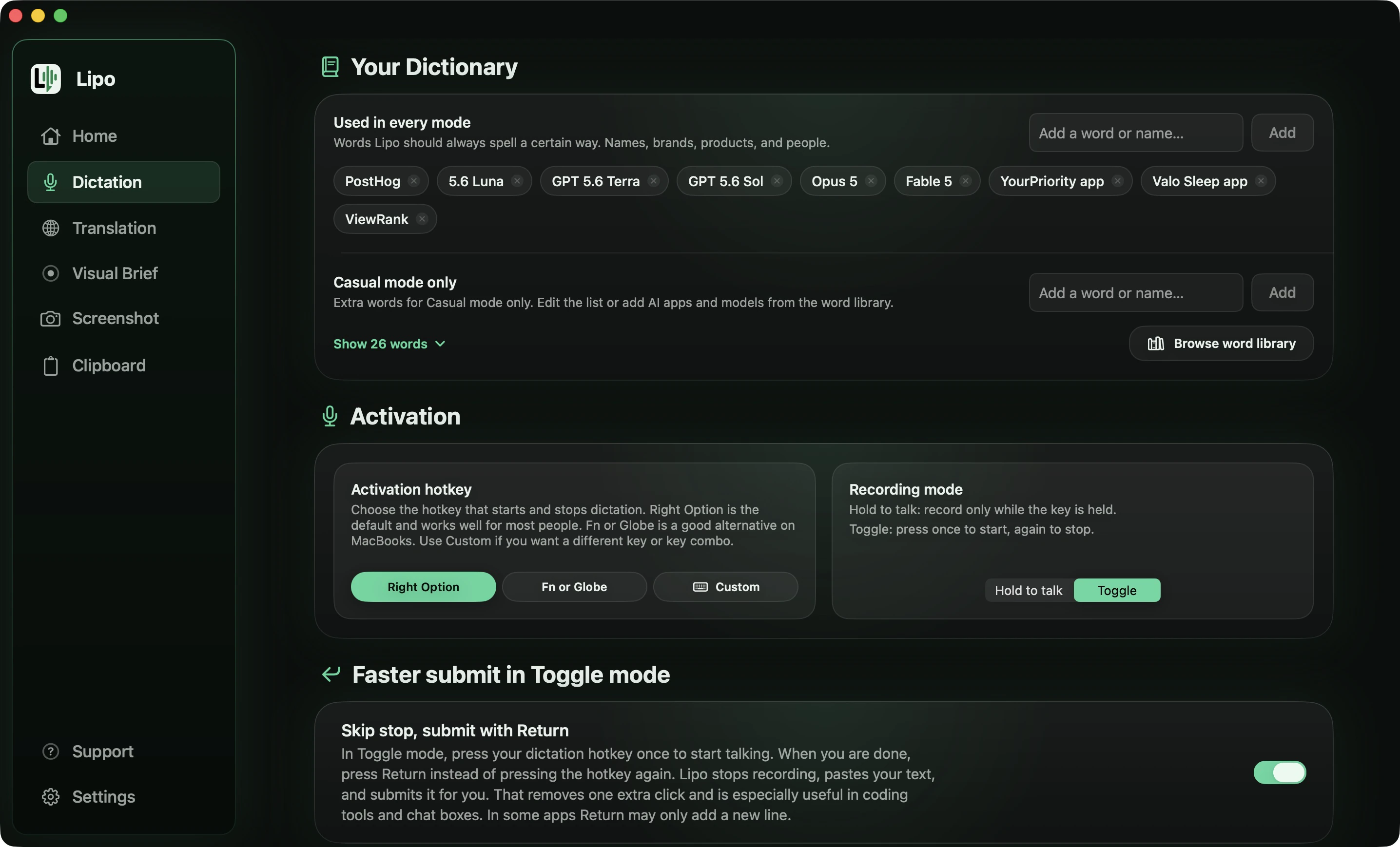
Every speech model makes mistakes with Indian names. "Aditya" becomes "Aditi", "Priyanka" loses a syllable, and "Kondapur" becomes something you cannot recognize. The fix is the custom dictionary. Add the name spelled the way you want, and Lipo uses that spelling from then on. Dictionary entries work in every language, so "Aditya" is spelled correctly whether you dictate in Hindi, in English, or translate from one to the other.
Add your own name first. Then add your team's names. Then add the products you talk about. It takes five minutes, and it fixes the most annoying type of error.
Is Wispr Flow better for Hindi?
For plain Hindi, Wispr Flow is a serious option. Hindi is in its top group of seven languages, the ones it calls "trained and tuned to match English-level performance". Aqua Voice lists Hindi too. Willow Voice claims more than 100 languages without a list, superwhisper depends on the speech model you choose, and Apple's dictation has Hindi for free.
Hinglish and translation are the differences. Wispr Flow's help centre says it detects one language per dictation, which is a hard case for "कल client के साथ meeting है". To be fair, Wispr has been testing a Hinglish voice model since early 2026, according to TechCrunch, so try it with your own Hinglish. What it does not say is which script it writes. Lipo writes those English words in Devanagari, the way Hindi newspapers print them. The Wispr Flow vs Lipo comparison covers the rest. For translation, Lipo works between any two of its 50+ languages, superwhisper translates into English only, and the others do not translate what you dictate. The comparison of dictation apps for non-English languages has the full table.
Is there free Hindi voice typing on Mac or Windows?
Yes. Apple's dictation is free, and for a short note in plain Hindi it is fine. One thing to know before you rely on it: Apple runs dictation on your own computer for most of its languages, but Hindi is not one of them. Apple publishes a separate on-device list and Hindi is absent from it, so your Hindi speech goes to Apple's servers and Hindi dictation needs a connection.
It fails in three ways: no automatic punctuation, no removal of filler words, and only one language at a time. English words inside a Hindi sentence are unpredictable. Sometimes you get डेडलाइन, and sometimes a Hindi word that sounds a little like it. To change between Hindi and English dictation, you switch language while dictating, with the Globe key or by clicking the language next to the cursor. There is no translation.
On a Windows laptop, Windows 11 voice typing (Windows key + H) includes Hindi in its language list, and Google Docs voice typing supports Hindi in Chrome. Lipo runs on Mac.
These free tools are enough for a lot of everyday use. Lipo is for when you write Hinglish all day, need punctuation without saying it, or want to speak Hindi and send English.
Frequently asked questions
Can I voice type in Hindi on a Mac?
Yes. Apple's built-in dictation supports Hindi (System Settings, Keyboard, Dictation). Lipo also supports Hindi voice typing in any app, with automatic punctuation, filler word removal and Hinglish support.
Does Apple dictation work for Hindi?
Yes, for plain Hindi. It doesn't add punctuation automatically, it listens in one language at a time, and it often gets English words inside a Hindi sentence wrong.
How do I type Hinglish on a Mac by voice?
Set Lipo's dictation language to Hindi and speak normally. Lipo writes the whole sentence in Devanagari. It recognizes English words like मीटिंग and क्लाइंट and writes them in Devanagari, the way Hindi newspapers do. Use the custom dictionary to keep a specific word in English letters.
Can I get romanized Hindi (Hindi in English letters)?
Not currently. Lipo writes Hindi in Devanagari. Romanized Hindi (Hindi in English letters) has no standard spelling, which is the main reason we haven't built it.
Can I speak Hindi and get English text?
Yes. Set the output language to English in Lipo's Translation tab. Lipo writes down the Hindi, cleans it, then translates it before typing it. Translation is included in every plan.
Can I voice type in Hindi on a Windows laptop?
Yes. Windows 11 voice typing (Windows key + H) includes Hindi, and Google Docs voice typing works in Chrome. Lipo runs on Mac.
Is there free Hindi voice typing for Mac?
Apple dictation is free and supports Hindi. But it does not add punctuation on its own, handle Hinglish well, or translate.
Does it understand regional accents?
Lipo works best with standard Hindi. A regional accent usually works too, but strong dialect words may not always come out exactly as you said them.
Keep reading
From the docs: Translation · Your Dictionary