 Lipo
LipoThe best dictation apps for non-English languages on Mac
The right dictation app depends on your language and what you need the text for. Here is what seven popular Mac apps offer outside English, and how to test them.
The best dictation app for a language other than English depends on the language and on what you need the text for. Apple's built-in dictation is free and covers about 34 languages, so try it first. Wispr Flow is a strong choice for Spanish, French, German, Italian, Portuguese, Hindi and Thai, the seven languages it says it has tuned to match English. superwhisper and MacWhisper suit people whose audio must stay on their own computer. Lipo, our app, is built for the cases the others say least about: languages Apple does not have, such as Bangla, Urdu and Tamil, sentences that mix English words into your language, and speaking one language to write another. Dictation is also called voice typing, and this guide uses both names.
How we compared these apps
We compared what each company publishes about its own app, as of October 2026: the languages it lists, whether it translates what you dictate, and what it says about sentences that mix two languages. We have not run a side-by-side accuracy test. The last section shows how to test any of these apps with your own voice in ten minutes, which tells you more than any list, including this one.
A long language list means an app can recognize those languages. It does not mean it is equally good in all of them. Wispr Flow says so itself, by sorting its languages into a tuned top group and a second group.
The seven apps at a glance
| App | Best for | Languages it lists | Translates what you dictate | English words inside your sentence |
|---|---|---|---|---|
| Apple dictation | Free notes in the languages it covers | About 34, in 59 regional versions | No | One language at a time |
| Wispr Flow | Spanish, French, German, Italian, Portuguese, Hindi, Thai | 100+, with seven in a tuned top group | No | One language per recording, says its help centre |
| Lipo | Languages Apple lacks, mixed sentences, translation | 50+ | Between any two of its languages | Recognized, and written in your script |
| superwhisper | Dictation that can stay on your computer | Depends on the model you choose | Into English only | Not documented |
| MacWhisper | Transcribing recordings and meetings | Depends on the model you choose | Into English only | Not documented |
| Willow Voice | Fast dictation, mostly in English | 100+, no list published | No | Switches mid-sentence, script not stated |
| Aqua Voice | Long prompts for AI tools | 49, full list published | No | Not documented |
1. Apple's built-in dictation: best free starting point
Apple's dictation is already on your Mac and costs nothing, so it is the right first test. It covers about 34 languages, published as 59 language-and-region versions. Our guide to using dictation on a Mac covers the setup, the shortcut and the full language list.
What you get depends on the language. Apple adds commas, periods and question marks by itself in English, Spanish, French, German, Italian, Dutch, Japanese, Korean, Thai and Chinese. In Hindi, Arabic, Portuguese, Russian, Turkish, Polish, Greek and many others you say each mark: "I will call you tomorrow comma after lunch full stop" gives "I will call you tomorrow, after lunch." Most languages run on your Mac, but twelve do not, Hindi among them, and those send your voice to Apple.
Pick something else if your language is not on Apple's list at all. Bangla, Urdu, Tamil, Telugu and most other South Asian languages are missing. Also look elsewhere if you need finished text: Apple writes what you said, including every "um" and false start (a sentence you begin, stop, and begin again), and it does not translate.
2. Wispr Flow: best for the seven languages it has tuned
Wispr Flow is the strongest competitor on this page for many writers, and its own research page explains why. It names seven languages "trained and tuned to match English-level performance": French, German, Hindi, Italian, Portuguese, Spanish and Thai. It describes the rest of its 100+ languages as "dozens of other major languages" with accurate dictation, which is a weaker promise in its own words. Arabic, Japanese, Korean, Mandarin and Russian are in that second group. Bangla, Urdu and Tamil are named in neither.
If you write in one of the seven, give Wispr Flow a real trial and compare it with any other app on edits alone. Our Wispr Flow vs Lipo comparison goes through the two apps feature by feature.
Pick something else if your sentences mix two languages. Its help centre says: "Flow detects one language per dictation, not per word." Hinglish, Banglish and Spanglish mix languages inside one sentence, which is exactly that case. The exception may be Hinglish: Wispr has been testing a Hinglish voice model since early 2026, TechCrunch reported, without saying which script it writes. It also has no setting to speak one language and paste another.
3. Lipo: best when your language is missing elsewhere, or you mix or translate
Lipo is a Mac app that treats its 50+ languages as main languages, including several that Apple and Wispr Flow do not name: Bangla, Urdu, Tamil, Telugu, Punjabi, Gujarati, Kannada and Malayalam. You hold a key, speak, and release it. Lipo then transcribes your speech, cleans it up, and pastes the finished text where your cursor is, in any app. Cleaning up means it removes filler words and false starts, adds punctuation, and keeps your correction when you change your mind in the middle of a sentence.
Three things are different from the apps above:
- Mixed sentences. Lipo recognizes the English words inside your sentence and writes them in your script, so "কালকে client এর সাথে meeting" comes out as clean Bengali text instead of a guess. The guide to dictating in multiple languages shows how.
- Translation between any two languages. You can speak Bangla and paste English, or speak English and paste Spanish. Lipo cleans up your speech before it translates. The guide to dictating in one language and typing in another covers this.
- More than dictation. You can attach a screenshot to what you are saying, keep a clipboard history, and use Visual Brief, which turns a screen recording and your spoken explanation into a prompt for an AI coding tool.
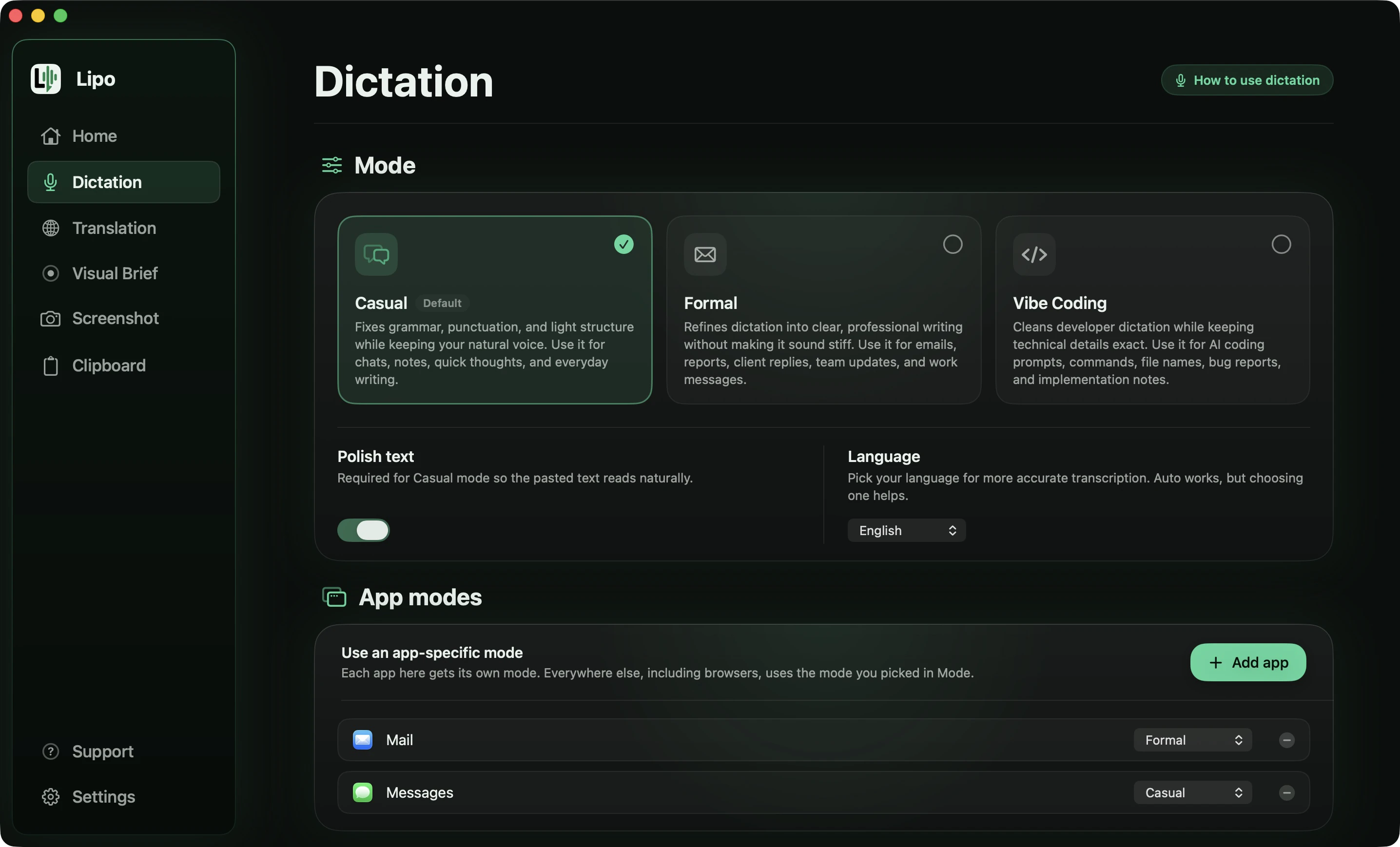
Pick something else if your audio must not leave your computer. Lipo keeps your history and recordings on your Mac, but transcription and cleanup happen on servers, so it needs an internet connection. It also runs only on Mac. And if you write only in one of Wispr Flow's seven tuned languages and never mix or translate, Lipo's main differences will not matter to you, so judge the two on edits alone.
4. superwhisper: best when audio must stay on your computer
superwhisper can run speech models on your own computer, so your audio does not have to be sent anywhere. It also offers cloud models, which cover more languages, and custom modes that change how the text is written. Its translation goes in one direction, into English.
Pick something else if your language needs a large model. The local models support fewer languages than the cloud ones, and the larger, more accurate models need a recent, powerful Mac.
5. MacWhisper: best for recordings, not live dictation
MacWhisper is built mainly for transcribing recordings: you give it an audio or video file, such as a meeting, a lecture or a voice memo, and it gives you the text. It uses Whisper models, a free speech-recognition model made by OpenAI that many apps use, so it covers many languages. Like superwhisper, it translates into English only.
Pick something else if you want to dictate into other apps all day. That is not what MacWhisper is designed for, and the transcript usually needs editing.
6. Willow Voice: best for fast dictation, mostly in English
Willow Voice is quick, and its English output is clean. It removes filler words, and its dictionary learns names and product terms as you use it. The company advertises SOC 2 Type II and HIPAA compliance, two security certifications that some employers require. It claims more than 100 languages without publishing a full list, though it has pages for some languages, Bengali among them. Its changelog says it switches languages mid-sentence, but not which script the English words are written in.
Pick something else if you need to check that your language is covered before you pay, or you need translation. Willow does not translate what you dictate.
7. Aqua Voice: best for long prompts to AI tools
Aqua Voice writes while you talk and improves the text as you go, which suits long prompts for AI tools. It has a custom dictionary and an adjustable writing style. It publishes all 49 of its languages, which is more useful than a bigger number with no list. Bengali, Hindi, Marathi, Tamil and Urdu are on it. Telugu, Punjabi, Gujarati, Kannada and Malayalam are not.
Pick something else if you need translation, or your language is not among its 49.
Notes on specific languages
Spanish
A Spanish question opens with ¿ and an exclamation with ¡, and apps trained mostly on English often leave both out. Test with one question and one name. Then check that "tú" or "usted" stayed the way you said it. The Spanish voice typing guide covers accents, ñ and Spanglish.
French
French joins words in speech and has many silent endings, so "c'est", "ses" and "sait" sound the same. Dictate a sentence with all three and see whether the app picks each one from the meaning. Also check that "vous" did not turn into "tu".
German
German compound nouns and separable verbs are hard for apps that guess one word at a time. Dictate a sentence with a verb like "aufstehen", whose first part moves to the end of the sentence, and check that the part lands in the right place. Then check that the formal "Sie" is still there after cleanup.
Italian and Portuguese
Both are easy to speak and hard to punctuate. Look for output in readable sentences, not one long sentence with commas where periods should be. Speakers of European and Brazilian Portuguese should test with their own accent rather than trust a demo.
Polish, Czech and Ukrainian
Word endings change with each word's role in the sentence, consonants come in groups, and accent marks are everywhere. These languages show quickly whether an app understands the sentence or only hears sounds.
Hindi, Bangla, Urdu and Tamil
These need their own guide, because Apple covers only Hindi and English words appear in almost every sentence. See voice typing for Indian languages, and the guides to Bangla and Hindi voice typing.
Arabic and Japanese
Arabic adds right-to-left text and missing vowel marks, and Japanese adds kanji that sound alike and keigo, the polite business form. Each has its own guide: Arabic and Japanese.
How to test any dictation app in ten minutes
- Dictate a real paragraph you would really send, in your language, at your normal speed.
- Put two or three names in it: people, places, your company.
- Include one English word in the middle of a sentence, the way you talk at work.
- Correct yourself once in the middle of a sentence.
- Count the edits you need before you could send it.
Run it on Apple's dictation first, since it is free and sets the baseline. Then run the same paragraph on anything you are thinking of paying for, including Lipo's free trial. The app that leaves you the fewest edits in your language is the right one for you.
Frequently asked questions
What is the best dictation app for languages other than English?
It depends on your language. Apple's built-in dictation is free and covers about 34 languages. Wispr Flow is strong in the seven languages it has tuned: Spanish, French, German, Italian, Portuguese, Hindi and Thai. Lipo covers 50+ languages, including Bangla, Urdu and Tamil, and adds cleanup, mixed-language sentences and translation. The right answer is the app that needs the fewest edits in your language.
Can Apple's built-in Mac dictation translate what I say?
No. Apple's dictation writes what you say in the language you selected, and it has no translation. To speak one language and write in another, you need an app with translation built into the dictation, such as Lipo.
Which Mac dictation apps can translate while you dictate?
As of October 2026, very few. Lipo translates between any two of its 50+ languages as part of the same dictation. superwhisper and MacWhisper translate into English only. Wispr Flow, Willow Voice, Aqua Voice and Apple's dictation do not translate what you dictate.
Which dictation app works with mixed languages like Hinglish or Spanglish?
Wispr Flow's help centre says it detects one language per dictation, though Wispr has been testing a Hinglish model since early 2026, TechCrunch reported. Willow Voice says it switches languages mid-sentence but not how it writes the English words. Lipo recognizes both languages and writes the English words in your script, for example मीटिंग inside a Hindi sentence.
Is Wispr Flow good for languages other than English?
For seven languages, yes by its own account: Spanish, French, German, Italian, Portuguese, Hindi and Thai are in its tuned top group. Its other languages, including Arabic and Japanese, are in a second group, and Bangla, Urdu and Tamil are not named.
Which dictation app supports the most languages?
Wispr Flow and Willow Voice both say more than 100, Lipo lists 50+, and Aqua Voice publishes 49. The number is less useful than it looks, because being on a list does not mean the results are good. Test your own language.
Is voice dictation private?
It depends on the app. Apps that run models on your own computer, like superwhisper and MacWhisper, do not need to send audio anywhere. Apple's dictation runs on your Mac for most languages but not all, and Hindi is one that is sent to Apple. Lipo keeps your history and recordings on your Mac, sends only what each request needs to the companies that process it, and never sells your content or uses it to train AI models.
Keep reading
From the docs: Translation · Dictation modes