 Lipo
LipoBangla voice typing on Mac: type Bengali by speaking
Apple's dictation does not support Bangla. Lipo does: you speak Bangla and it pastes clean Bengali text, or English, into any app.
Yes, you can voice type in Bangla on a Mac, but not with Apple's built-in dictation. Bengali is not in Apple's dictation language list. That is why Apple Community threads asking "how do I enable Bangla dictation" end without an answer. You need an app from another company. Lipo is a Mac app that treats Bangla as a main language, not a small extra. You hold a key and speak Bangla, and Lipo pastes clean Bengali script into whatever app you are using. It also understands Banglish (Bangla with English words mixed in), and it can translate what you said into English before pasting it. Bangla voice typing is also called Bangla voice dictation, and this guide uses both names.
If you would rather read about Lipo in Bangla, see বাংলায় Lipo.
We build Lipo, and one of us types Bangla every day. So this post is a guide, and also the honest opinion of someone who waited a long time for this to exist.
Why is typing Bangla on a Mac so slow?
Every typing option asks you to think in two alphabets at the same time.
Avro is the tool most Bangladeshis use. It is phonetic, so you type "ami tomake bhalobashi" in English letters and Avro changes it to আমি তোমাকে ভালোবাসি. It works, and it is free. But you are still typing Bangla in English letters, and then checking whether Avro chose the correct Bengali letters. Bijoy uses the traditional Bangla keyboard layout. That is fast if you learned it in the 1990s and very hard if you did not. Apple's own Bangla keyboards (Bangla and Bangla QWERTY) are in System Settings, but they have the same problem as Bijoy: you have to know where each letter is.
Then there is the juktakkhor problem. Juktakkhor are letters joined into one shape, such as ক্ষ, জ্ঞ and ষ্ণ. Each one takes three or four key presses in every layout. A 200-word Bangla email needs a lot of key presses.
Speaking avoids all of this. You already know how to say the sentence.
How to voice type in Bangla on a Mac with Lipo
Setup takes about two minutes. Install Lipo (it needs macOS 15.2 or later), choose Bangla under Dictation, then Language, and allow the microphone and accessibility permissions when Lipo asks. Accessibility is the permission that lets Lipo paste into WhatsApp Desktop, Gmail, Google Docs or any other app.
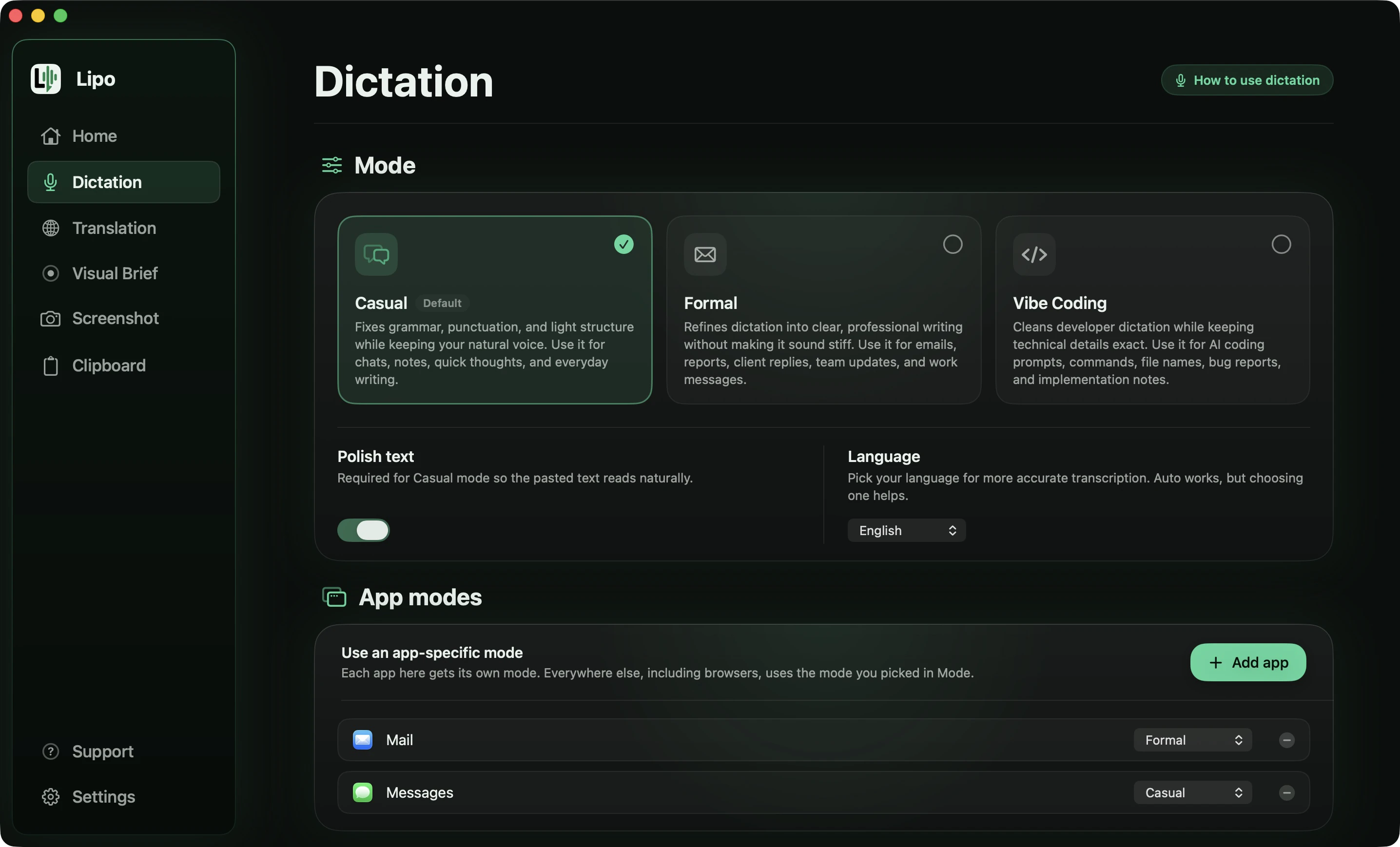
Then hold the right Option key, say your sentence, and release the key. Lipo listens only while the key is down. When you let go, it transcribes what you said, adds punctuation, removes filler words like "ইয়ে" and "মানে" (the words people say while thinking) and false starts, and pastes the Bengali text where your cursor is. It does not type letter by letter.
This is the kind of message you might send a colleague before a client meeting, with six problems in it.
You say
"ইয়ে... আগামীকাল সকাল দশটায় না, এগারোটায় clientটার সাথে meeting আছে। আর রিপোর্টটা, রিপোর্টটা আজকের মধ্যে পাঠায় দিও প্লিজ। presentationটাও লাগবে। মানে ওই নতুনটা, পুরানটা না। আর fileটার নাম report ড্যাশ final ডট pdf।"
Lipo pastes
আগামীকাল সকাল এগারোটায় ক্লায়েন্টটার সাথে মিটিং আছে। রিপোর্টটা আজকের মধ্যে পাঠিয়ে দিও, প্লিজ। প্রেজেন্টেশনটাও লাগবে, ওই নতুনটা, পুরানটা না। আর ফাইলটার নাম report-final.pdf।
Six things happened there:
- The correction was kept, not the first answer. You said ten o'clock, stopped, and said eleven. The message says eleven.
- The stutter is gone. "রিপোর্টটা, রিপোর্টটা" is written once, and the filler words "ইয়ে" and "মানে" do not appear.
- English words became Bengali letters, with the suffix attached. "clientটার" became ক্লায়েন্টটার, "presentationটাও" became প্রেজেন্টেশনটাও and "fileটার" became ফাইলটার, each as one word with no gap in the middle. This is the part most apps get wrong, and it is why Banglish usually comes out broken elsewhere.
- The file name did not. "Report ড্যাশ final ডট pdf" became report-final.pdf, in English letters. A loanword gets written in Bengali; a file name has to be typed exactly or it will not open.
- Two half sentences became one. You paused after "প্রেজেন্টেশনটাও লাগবে" and started again. Lipo joined them, because it was clearly one thought.
- Your spelling was standardized, your voice was not. "পাঠায় দিও" became "পাঠিয়ে দিও", but "প্লিজ" and the way you talk to a colleague are untouched. Casual mode fixes the writing, not the person.
Holding the key while you talk is good for short messages. For a longer email, switch to Toggle mode in settings. Press the key once to start, and press it again (or press Return) to stop.
Does Banglish work?
Mostly yes. This is the part that shows whether an app really supports Bangla, or only lists Bangla as one name among many.
Nobody in Dhaka speaks pure Bangla at work. A normal spoken sentence is "কালকে client এর সাথে meeting আছে, presentation টা ready করে রাখো।" That sentence has four English words, two of them with Bangla suffixes attached. A speech to text model (the technology that turns spoken audio into written words) that listens for only one language hears "client" and either drops it or replaces it with a Bangla word that sounds a little similar. Then the sentence no longer makes sense.
Lipo recognizes both languages, and the cleanup step then writes the whole sentence in Bengali script, English words included: ক্লায়েন্ট, মিটিং, প্রেজেন্টেশন, রেডি. We chose this on purpose. It is how English loanwords appear in Prothom Alo, in a formal email and in a textbook. It also keeps the pasted text in one script that any Bangla reader can read. The suffix stays attached, so "presentation টা" becomes প্রেজেন্টেশনটা with no space.
Maybe you want a specific word to stay in English letters, for example a product name or a term your team always writes in English. Add it to the custom dictionary spelled the way you want it, and Lipo will use that spelling. This is not perfect. Very short English words that sound like Bangla words are still confused sometimes. If you find a sentence that fails, tell us, and we will add it to our tests.
For names and brand words that are always written wrong, add them to the custom dictionary. For example your company name, your colleague "Tanvir" (not "Tanveer"), or the Bengali spelling of your own name. Dictionary words work in every language you dictate in, and Lipo keeps them when it translates.
How to speak Bangla and get English text
A lot of Bangla speakers write in English all day. They write to clients on Upwork and Fiverr, to a manager in Singapore, or to a professor in the UK. You form the thought in Bangla, translate it in your head, and then type English. Lipo removes the translation step in your head.
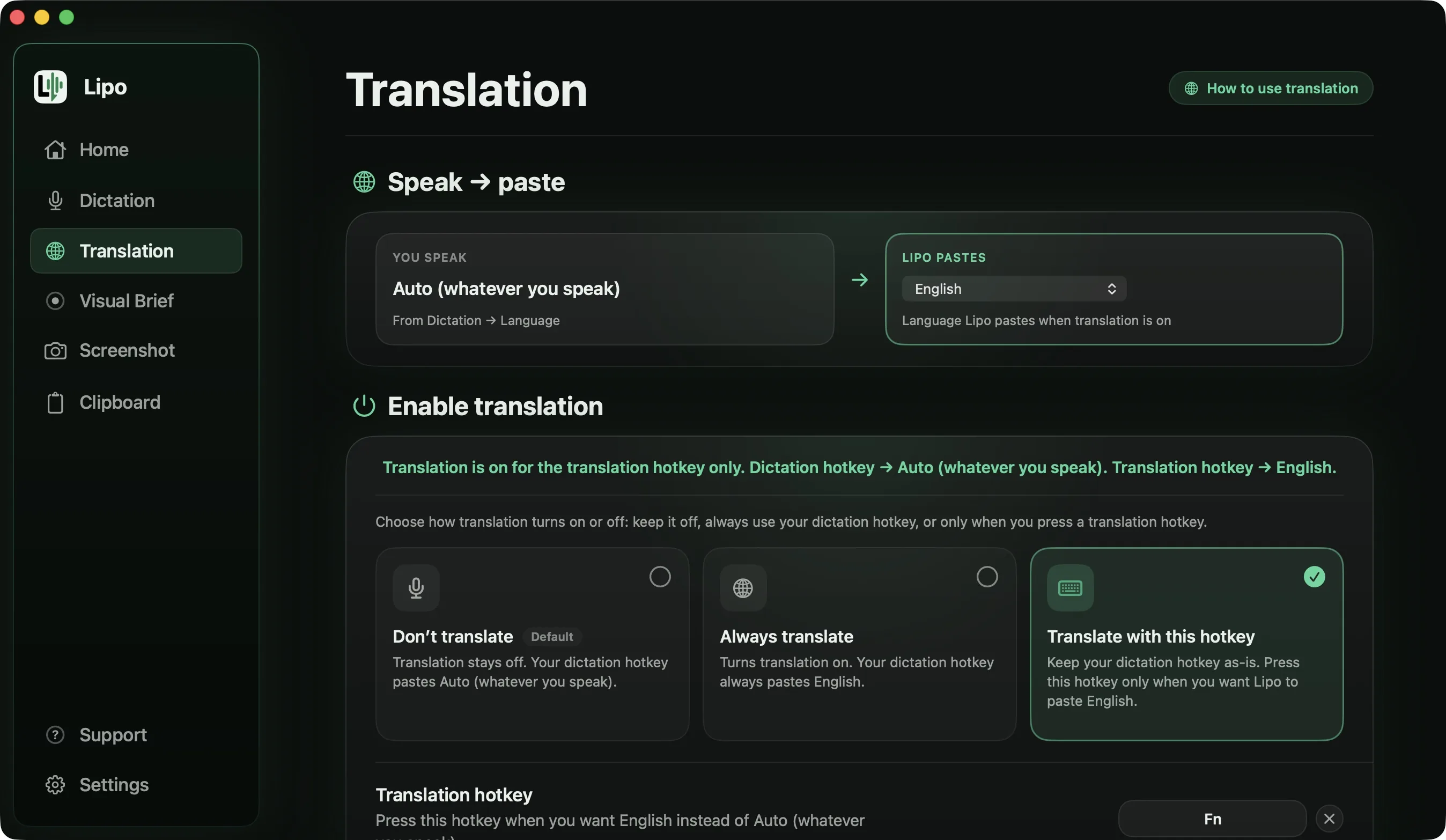
In the Translation tab, set "Lipo pastes" to English. You can translate everything you dictate, or keep your normal key for Bangla and add a second key for English. The second way suits anyone whose family WhatsApp is in Bangla and whose client work is in English, often in the same afternoon. Lipo cleans the Bangla before it translates, so the ইয়ে and মানে never reach the English.
Speed is not the only reason this matters. When you think in Bangla but write in English, you sound like a simpler person than you are. You know the exact tone you want with a client, the right amount of respect, and the small joke that would make them smile. In English you leave all of that out, because you are busy getting the grammar right. When you speak Bangla and let Lipo translate it, the tone stays. You get to say what you really meant.
Here is a whole message, spoken the way people actually speak one.
You say (Bangla, Formal mode, output language set to English)
"স্যার, ধন্যবাদ। আপনার feedbackটা পাইছি। আমি, আমি দুইটা জিনিস clear করতে চাই। Logoটার color আপনি প্রথমে নীল বলছিলেন, পরে গতকাল সবুজ বলছিলেন, কোনটা রাখব? আর homepage এর bannerটা কি mobile এর জন্য আলাদা করে বানাব? কাজটা বৃহস্পতিবারের মধ্যে দিয়ে দিব।"
Lipo pastes
Dear Sir,
Thank you, I have received your feedback. I would like to clarify two things.
You first mentioned blue for the logo color, and then green yesterday. Which would you like me to use? And should the homepage banner be designed separately for mobile?
I will deliver the work by Thursday.
"Dear Sir" is there because you began with স্যার. Lipo adds no greeting, subject line or sign-off of its own, which is why the email ends with your last sentence and no "Best regards". The repeated "আমি, আমি" is written once. The two questions stayed in the paragraph rather than becoming a list, because Lipo only makes a list from three or more items. And the spoken forms "পাইছি" and "বলছিলেন", which are how people actually talk and not how anyone writes to a client, came out as ordinary professional English.
If you choose Formal mode and speak formal Bangla, the English is formal too. If you choose Casual mode and speak the way you talk to a friend, the English stays casual. The guide to dictating in one language and typing in another covers translation in more detail.
Translation is included in every plan. Plans and prices are on the pricing page.
Which other dictation apps support Bangla?
Fewer than the language totals suggest. Wispr Flow says it supports more than 100 languages, but Bangla is not among the 21 it names. It sits in the "75+ others". Aqua Voice includes Bengali in its published list of 49 languages. Willow Voice has a page saying it transcribes Bengali, and superwhisper depends on the speech model you choose. Apple's dictation has no Bangla at all.
Banglish is where they differ most. Wispr Flow's help centre says it writes each recording in one language, so a Dhaka office sentence that is half English comes out unpredictably. Willow's Bengali page does not mention mixed sentences or translation. Lipo writes the English words in Bengali script with the suffix attached, as in ক্লায়েন্টটার. For translation, Lipo works between any two of its 50+ languages, superwhisper translates into English only, and the others do not translate what you dictate. The comparison of dictation apps for non-English languages has the full table.
Is there free Bangla voice typing on Mac or PC?
Yes, with limits. Here are the free options, because "is it free?" is usually the first question.
Google Docs voice typing supports Bengali and costs nothing. But it only works inside a Google Doc, in Chrome, Edge or Safari. Google says punctuation might not be available in every language, and its spoken punctuation commands work only in English, so you add the full stops yourself. And you have to copy the result and paste it where you really wanted it. For writing a long Bangla document, it is fine. For replying to a WhatsApp message, it needs too many steps.
Gboard on your phone does Bangla voice typing, and many people already write Bangla this way, talking into their phone and sending the text to themselves. It sometimes gets Bangla words wrong. Lipo is our replacement for that phone habit on a computer.
Websites for "Bangla voice typing" exist too. Most of them are simple pages built on the same Google speech technology. They have the same limits as Google Docs, plus ads.
Windows voice typing (Windows key + H) does not include Bangla either. Microsoft's language list has Hindi, Tamil, Telugu, Marathi and Gujarati, but not Bangla, so on a Windows PC or laptop the free option is Google Docs voice typing in Chrome. Lipo runs on Mac.
Apple dictation does not support Bangla. If that changes in a future version of macOS, we will update this post.
Tips for better Bangla voice dictation
Speak in whole sentences, not word by word. The cleanup step reads the whole sentence to understand the meaning. If you give it single words, it has nothing to understand.
Say English words the way you say them in a Bangla conversation. Do not change to an American accent for "meeting". The model expects English with a Bangla accent inside a Bangla sentence, because that is what it learned from.
If you correct yourself out loud ("সোমবার, না, মঙ্গলবার"), Lipo usually keeps the correction and removes the mistake. You do not need to stop and record again.
Use your computer's built-in microphone or a wired headset. AirPods work, but their microphone reduces the audio quality a lot. Bangla's aspirated consonants (খ, ঘ, ঠ), the sounds you make with a strong push of breath, are the first thing that gets lost.
Frequently asked questions
Can I voice type in Bangla on a Mac?
Yes, with an app from another company. Apple's built-in dictation doesn't support Bengali. Lipo supports Bangla voice typing in any app, with automatic punctuation and cleanup.
Does Apple dictation support Bengali?
No. Bengali isn't in Apple's dictation language list on macOS or iOS as of this writing. Hindi is supported, but Bangla, Urdu and Tamil are not.
Is there free Bangla voice typing for Mac?
Google Docs voice typing supports Bengali for free, but only inside a Google Doc, in Chrome, Edge or Safari, without automatic punctuation, and with accuracy that is not consistent. There's no free Bangla voice typing that works well in every app on macOS.
Can I voice type in Bangla on a Windows PC?
Not with Windows voice typing, which does not include Bangla. Google Docs voice typing works for free in Chrome on a PC, inside a Google Doc. Lipo runs on Mac.
Can I mix Bangla and English when voice typing?
Yes. Lipo recognizes Banglish sentences and writes the English words in Bengali script (মিটিং, ক্লায়েন্ট), the way they appear in printed Bangla, with suffixes attached. Add a word to the custom dictionary if you want to keep it in English letters.
Can I speak Bangla and get English text?
Yes. Set Lipo's output language to English in the Translation tab. Lipo writes down your Bangla, cleans it, then translates it before typing it. Translation is included in every plan.
Does it work in WhatsApp, Facebook and Gmail?
Yes. Lipo pastes into any field where you can type, including WhatsApp Desktop, Facebook and Gmail in the browser, Mail, Notes and Messages.
Does Lipo work for Bangladeshi and Indian Bangla?
Both. Lipo works best with standard Bangla, the kind used in Dhaka, Kolkata and in print. A regional accent usually works too, but strong dialect words may not always come out exactly as you said them.
Keep reading
From the docs: Translation · Your Dictionary