 Lipo
LipoVoice typing for WhatsApp, Telegram and Slack on Mac, in any language
Your family group, a client, and your team in Slack, often in three languages in one morning. Here is how to answer all of them by speaking, without changing a setting in between.
You can voice type into WhatsApp Desktop, Telegram, Slack, Messages, Discord and Teams with one app and one key. Lipo is our app. It pastes into any text field (any box where you can type), so it does not need a plugin for any of these apps. You can answer your family group in Bangla, a client in English and your team in Slack without opening a settings panel between messages. Whether you call it voice typing or voice dictation, one key does the work.
This page is about messaging apps. For the general picture, start with what voice typing is and how it differs from dictation.
What does a real day look like?
In the morning, the family WhatsApp group in Dhaka asks when you will arrive. You hold the right Option key, say the answer in Bangla, and release the key. Lipo pastes Bengali script (the script used to write Bangla) into the box. Ten minutes later a client on WhatsApp asks about an invoice. You use the same key, answer in English, and Lipo pastes English. Then you give a standup update in Slack in English, and write to a friend in Madrid on Telegram in Spanish. You changed nothing in Lipo between those four messages.
Apple's built-in dictation supports many languages too, but only one at a time. You add the languages in System Settings, then switch between them with the Globe key while you dictate. Lipo's auto-detect (a setting where Lipo guesses the language you spoke) makes the switch for you. If you prefer to choose the language yourself, changing the dictation language takes two clicks in the menu.
How to set up voice typing for WhatsApp, Telegram and Slack
- Install Lipo from uselipo.com. It needs macOS 15.2 or later. There is a free trial.
- Choose your main dictation language during onboarding, or turn on auto-detect if you change languages often. You can change this later under Dictation, then Language.
- Grant the microphone and accessibility permissions. A permission is your approval for the app to use one part of your computer. The accessibility permission lets Lipo paste into other apps. If Lipo does not paste, see the troubleshooting docs.
- Open WhatsApp Desktop, Telegram or Slack and click into the message box.
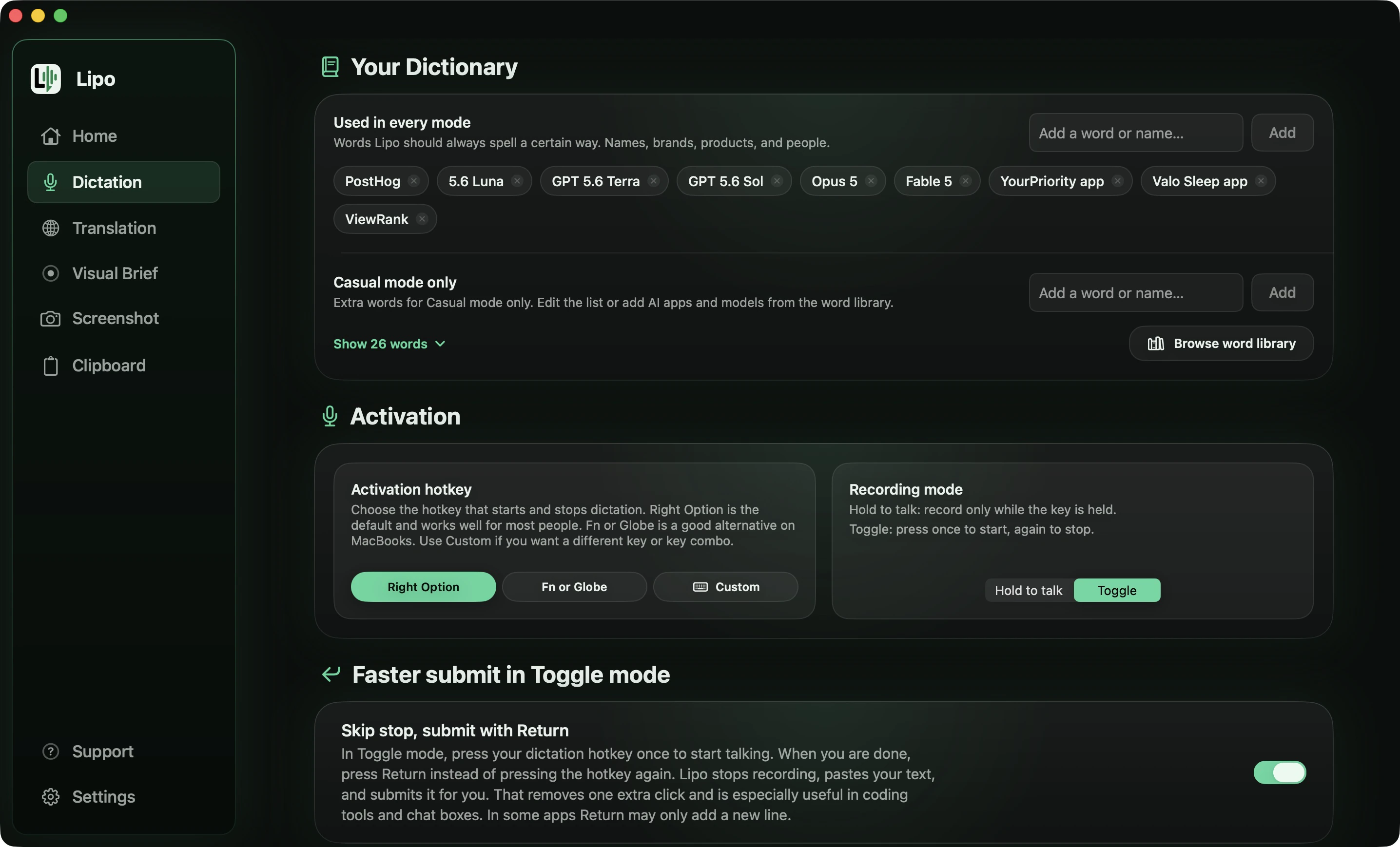
- Hold the hotkey and speak. A hotkey is a key you press to start recording; the default is the right Option key. When you release the key, Lipo transcribes your speech, which means it turns the speech into text. Then Lipo cleans it up: it removes filler words and false starts, adds punctuation and fixes small mistakes. Filler words are sounds and words that carry no meaning, such as "um". A false start is when you begin a sentence, stop, and begin again. Then Lipo pastes the finished text where your cursor is. The cursor is the blinking line that shows where text will go. Lipo does not type letter by letter, and it does not show text while you speak. Press Return to send the message, the same as if you had typed it.
Hold-to-talk is the right default for messages. Toggle mode is better for a long Slack post or a Telegram message with three paragraphs. In Toggle mode, you press once to start and press again (or press Return) to stop.
App-by-app notes
WhatsApp Desktop. Both the installed app and web.whatsapp.com in a browser work. One thing to know: in WhatsApp, Return sends the message, and in Lipo's Toggle mode Return is also one way to stop recording. Turn on "Skip stop, submit with Return" and a single press of Return does all of it: stop recording, paste the text, send the message. This works in every app where Return submits, so Telegram, Slack, Discord and Teams all behave the same way. Leave the setting off, or use hold-to-talk, when you would rather read the text before it goes.
Telegram. Telegram works the same as WhatsApp. Its message box handles long text well, so Toggle mode is useful there.
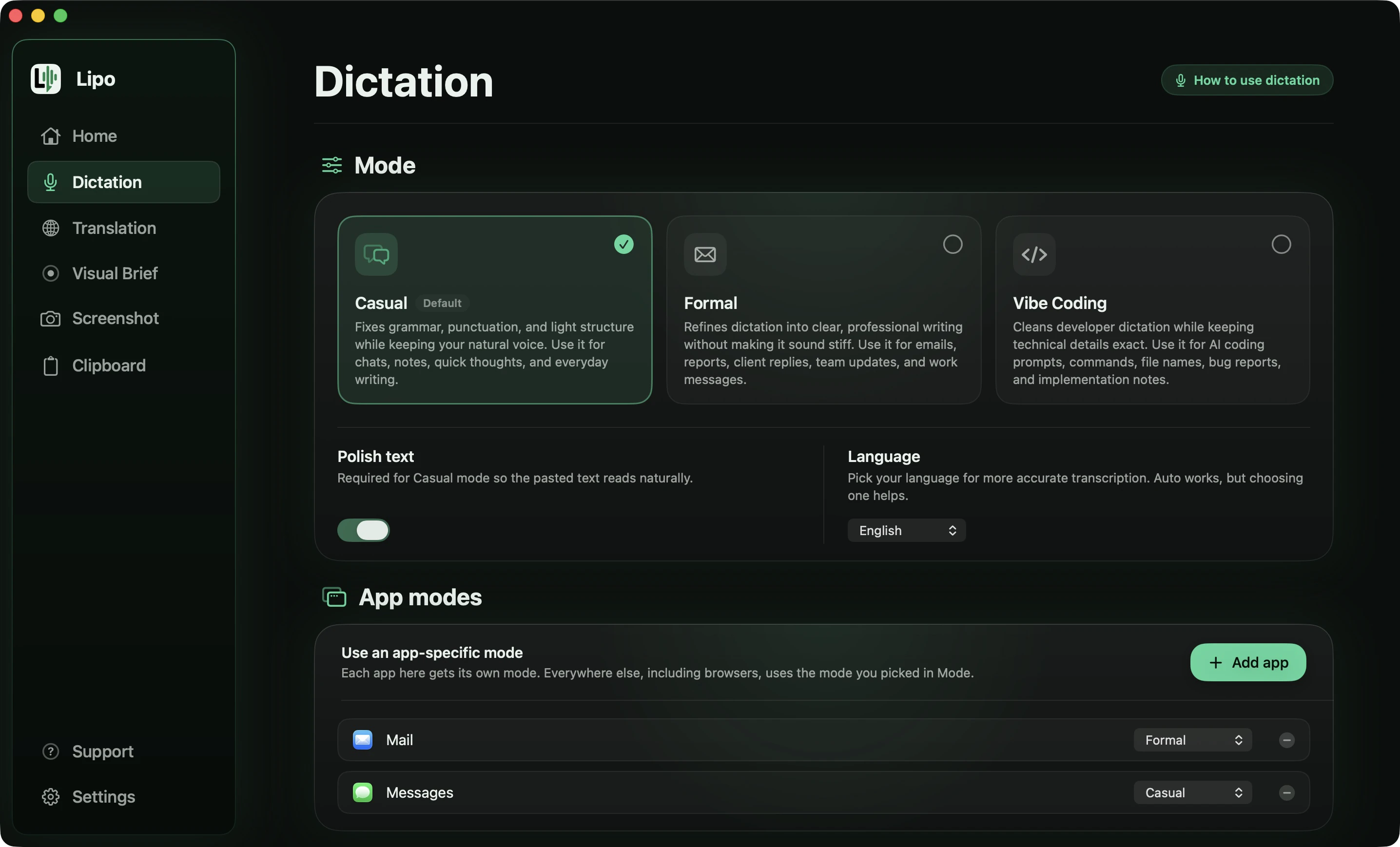
Slack. Casual mode is usually right for Slack. It fixes grammar and punctuation and removes the filler words, but it keeps your way of speaking. Formal mode rewrites in a professional style, which is right for Mail. You can pin a mode to an app under dictation modes, so Slack can always be Casual and Mail can always be Formal. Pinning applies to installed apps. Websites in a browser tab use your default mode. If you use Slack in Chrome instead of the Slack app, set the default mode to Casual.
Messages, Discord, Teams, Signal. Click in the box, hold the key, and speak.
What do messy messages look like?
Here are four messages the way people actually say them, and what Lipo pastes in the box. Two are family messages, two are work.
A message to the family WhatsApp group, in Bangla with English words inside it.
You say
"আম্মু, ইয়ে, শুক্রবার না, শনিবার আসতেছি, train এ, দুপুরে, দুপুরে খাবো একসাথে। আর ওই ওষুধটা, ওষুধটা কি শেষ? শেষ হইলে বইলো, আমি আসার পথে নিয়া আসব। আর ছোট আপুরে বইলো ও যেন reportটা mail কইরা দেয়।"
Lipo pastes
আম্মু, শনিবার ট্রেনে আসতেছি, দুপুরে একসাথে খাবো। ওষুধটা কি শেষ? শেষ হইলে বইলো, আমি আসার পথে নিয়া আসব। আর ছোট আপুরে বইলো ও যেন রিপোর্টটা মেইল কইরা দেয়।
The correction from Friday to Saturday was kept, "ইয়ে" is gone, and the repeated "দুপুরে" and "ওষুধটা" are each written once. "Train" became ট্রেনে with the suffix attached, and "reportটা" became রিপোর্টটা as one word with no gap in the middle, which is the part most apps get wrong. Your spoken forms, "আসতেছি", "বইলো" and "কইরা", are untouched, because Casual mode keeps the way you talk to your mother.
A message to your mother on Telegram.
You say
"Mamá, eh... el domingo no, el sábado llegamos, llegamos como a las, a las dos, o sea después de comer. No hagas nada de comida, que llevamos nosotros. Ah, y somos cinco, no cuatro, que viene la Sofi también. Y el tren llega a Atocha a la una y media."
Lipo pastes
Mamá, llegamos el sábado como a las dos, después de comer. No hagas nada de comida, que llevamos nosotros. Ah, y somos 5, no 4, que viene la Sofi también. El tren llega a Atocha a la 1:30.
Both corrections survived, Sunday to Saturday and four people to five. The repeated "llegamos" and "a las" are written once, "eh..." and "o sea" are gone, and the spoken numbers became 5, 4 and 1:30. "La Sofi", with the article before the name, is left alone: that is how you talk, not a mistake.
A message to a colleague about tomorrow's delivery.
You say
"طيب يا محمد، بخصوص الطلبية بتاعة بكرة، أنا... أنا مش هقدر أعدي الصبح، هعدي بعد الضهر. لو الأوضة مقفولة سيبها مع الأمن. وابقى ابعتلي رقم الشحنة عشان أتابعها."
Lipo pastes (Casual mode)
طيب يا محمد، بخصوص طلبية بكرة، مش هقدر أعدي الصبح، هعدي بعد الضهر. لو الأوضة مقفولة سيبها مع الأمن. وابعتلي رقم الشحنة عشان أتابعها.
The false start "أنا... أنا مش" is gone. Everything else stays as you said it, including the spoken forms, because Casual mode does not raise your register. A message to a colleague on WhatsApp should not come back reading like a contract.
A standup update in Slack.
You say
"so um the deploy is, the deploy is done, done on staging I mean not prod. today I've got the flaky checkout test, the refund endpoint, and Priya's PR to review. one blocker, the staging DB is still on the old schema, so someone with access needs to run the migration."
Lipo pastes (Casual mode)
The deploy is done on staging, not prod.
Today I've got:
- The flaky checkout test
- The refund endpoint
- Priya's PR to review
One blocker: the staging DB is still on the old schema, so someone with access needs to run the migration.
This one shows the part people do not expect. You never said "bullet point", but you listed three parallel things, so Lipo wrote them as a list and kept "Today I've got" as the line that introduces it. The blocker became its own paragraph because the topic changed. "Um", "like" and "I mean" are gone, while "I've got" stayed: Casual mode does not tidy your contractions away. Two items would have stayed in the sentence; it takes three to make a list.
Speak your language, send English in Slack
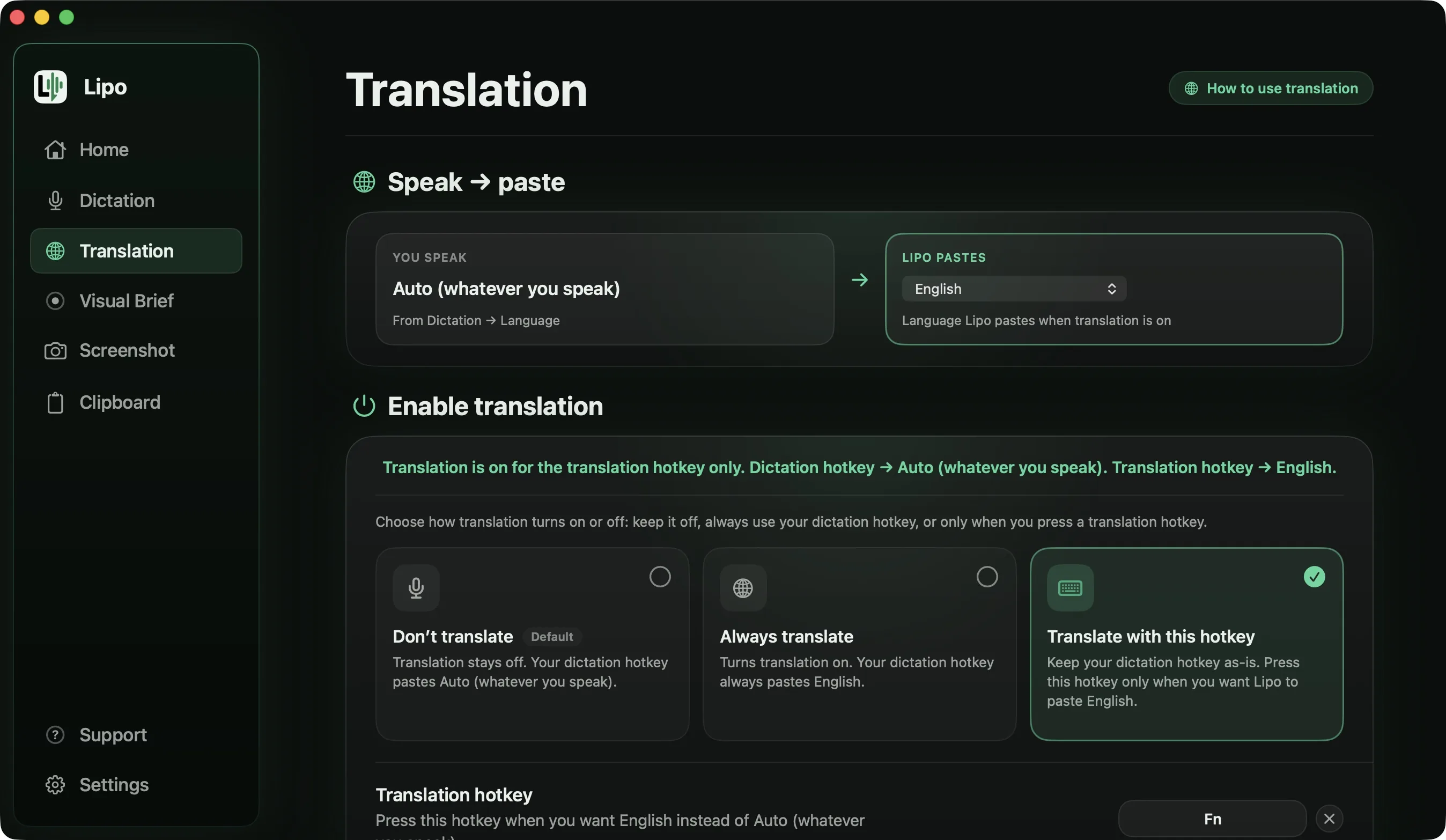
In the Translation tab, set "Lipo pastes" to English and choose "Translate with this hotkey". Your normal hotkey pastes what you said in the language you spoke. The second hotkey pastes English.
When you write in a second language, you often say less than you mean, because you are thinking about grammar. When you speak your own language and Lipo translates it, the meaning and the tone stay. With translation on, Lipo transcribes, cleans up, then translates the cleaned text, then pastes.
You say (Bangla, Formal mode, output language set to English)
"ভাই, ওই PR টা... মানে গতকালেরটা না, আজ সকালেরটা, ওটা একটু review করে দিয়েন। আমার আজকে merge করা লাগবে, কারণ কালকে release। আর testগুলা সব pass করছে, শুধু ওই checkout এরটা মাঝে মাঝে fail করে।"
Lipo pastes in Slack
Could you review this morning's PR, not yesterday's? I need to merge it today, because the release is tomorrow. All the tests pass except the checkout one, which fails intermittently.
It works in the other direction too. Speak English, send Spanish to your family. Set "Lipo pastes" to Spanish, speak in English, and press the translate hotkey:
You say
"hey so um I can't do the call tonight, I've got, I've got work until like nine. can we do tomorrow same time? and tell dad I did send the photos, they're in the group."
Lipo pastes in Telegram (Casual mode, output language set to Spanish)
Oye, no puedo hacer la llamada esta noche, tengo trabajo hasta las 9. ¿Podemos hacerla mañana a la misma hora? Y dile a papá que sí le mandé las fotos, están en el grupo.
"Lipo pastes" holds one language at a time. If you translate into English for Slack in the morning and into Spanish for family in the evening, you change that one setting in between. The translation post covers the options, and the translation docs have the settings. Translation is included in every plan.
Can I attach a screenshot to a Slack message?
Yes. While you are recording, the small floating window (Lipo calls it the pill) has a screenshot button. Click it, capture the error on the screen, and keep speaking. When you release the hotkey, Lipo pastes the text into the Slack message and attaches the screenshot to the same message. Separate screenshot hotkeys and an editor for cropping, blurring a customer's email address or drawing an arrow are in the screenshots docs.
If the message is for Claude, ChatGPT or Cursor rather than a person, Visual Brief turns a screen recording and your spoken explanation into a prompt for the AI tool.
Do Wispr Flow and other dictation apps work in WhatsApp and Slack?
Yes. Wispr Flow, Willow Voice, Aqua Voice and superwhisper all paste into any text field, so they all work in WhatsApp Desktop, Telegram and Slack. The differences are elsewhere. Wispr Flow's help centre says it writes each recording in one language, so a Banglish message to your family comes out unpredictably. For translation, Lipo works between any two of its 50+ languages, superwhisper translates into English only, and the others do not translate what you dictate. The comparison of dictation apps for non-English languages has the full table.
Are my messages private?
Lipo stores your history on your computer, not on our servers. Transcription and cleanup happen in the cloud, which means on our servers over the internet. The details are in the privacy policy. Lipo deletes Visual Brief recordings from your computer after 7 days.
Frequently asked questions
Can I voice type in WhatsApp on a Mac?
Yes. Lipo pastes into WhatsApp Desktop and web.whatsapp.com in the same way it pastes anywhere else. Click in the message box, hold the hotkey, speak, release, then press Return to send.
Does it work in Telegram and Slack too?
Yes, and in Messages, Discord and Teams. Any app with a text field and a cursor works, with no plugin or integration.
Will Return send the message before I've checked it?
In hold-to-talk mode, no. You release the key, read the text, then press Return yourself. In Toggle mode, Return stops the recording. If "Skip stop, submit with Return" is on, that one press also pastes and sends, in any app where Return submits. Leave the setting off if you want to read the text first.
Can I switch languages between conversations?
Yes. Turn on auto-detect and speak the language of the conversation, or change the dictation language under Dictation, then Language.
Can I speak Bangla and send English in Slack?
Yes. Set "Lipo pastes" to English in the Translation tab and use the translate hotkey. Lipo transcribes, cleans up, then translates, then pastes.
Can I speak English and send Spanish?
Yes, any pair of its 50+ languages, in either direction. Set "Lipo pastes" to Spanish and speak in English.
Can I attach a screenshot to a Slack message while dictating?
Yes. Click the screenshot button on the pill while you are recording. When you release the hotkey, Lipo pastes the text and attaches the screenshot to the same message.
Does Slack use a different mode from Mail?
It can. Pin Casual to Slack and Formal to Mail under dictation modes. Slack in a browser tab uses your default mode.
Are my messages stored anywhere?
Lipo stores your history on your computer. Transcription and cleanup are processed in the cloud. See the privacy policy for details.
Keep reading
From the docs: Dictation modes · Screenshots