 Lipo
LipoSpanish voice typing on Mac: accents, ñ and usted
A Spanish voice typing app has to get the accent marks, the ñ, the opening ¿ and the choice between tú and usted right. Here is how to voice type Spanish on a Mac, with Apple's free dictation or with Lipo.
Yes. Apple's built-in dictation types Spanish on a Mac for free, with versions for Spain, Mexico, Colombia, Chile and the United States. In four of the five it adds commas and periods on its own. It also keeps your "este... o sea", and it listens for one language at a time, so the English word in a Spanglish sentence often comes out wrong. Lipo is our app for those gaps. It transcribes your Spanish (turns your speech into text), fixes accents and the ñ, adds ¿ and ¡, removes filler words, keeps your tú or your usted, and pastes the result in any app. It can also paste English instead. You will see this called Spanish voice typing, Spanish voice dictation and Spanish voice to text, and all three mean the same thing.
If you would rather read about Lipo in Spanish, see Lipo en español.
How do you turn on Spanish dictation on a Mac?
Apple's dictation is free, and setting it up takes about a minute.
- Open the Apple menu, choose System Settings, and click Keyboard.
- Turn on Dictation.
- Click Edit next to Languages, tick Spanish, and choose your region: Spain, Mexico, Colombia, Chile or the United States.
- Click into any text box, press the dictation shortcut, and speak. If your keyboard has a microphone key, that key is the shortcut.
Apple lists automatic punctuation for the Spanish of Spain, Mexico, Colombia and the United States, so commas, periods and question marks arrive without you saying them. Chile is not on that list. Apple does not say whether the opening ¿ and ¡ are included, so test one question before you trust it.
If you also write in English, tick English in the same Languages list. While you dictate, the Globe key switches between the two. Apple still listens for one language at a time, so a sentence that mixes them is the hard case.
Why is Spanish voice typing hard?
The details that mark careful Spanish are exactly the details that weak dictation gets wrong.
Accent marks come first. "Está" and "esta" are different words, and so are "sí" and "si", "él" and "el", and "cómo" and "como". Many apps handle the common cases and then fail on "qué" and "que" in indirect questions. To get those right, the app has to understand the whole sentence.
Next is the ñ. "Año" and "ano" are not the same word, and speech models trained mostly on English often replace ñ with a plain n.
Correct Spanish opens a question with ¿ and an exclamation with ¡. A missing ¿ is still a mistake in a cover letter or a legal document.
Register (the level of formality) is another problem. Spanish makes you choose tú or usted in every sentence, and the wrong choice is either rude or strangely stiff. Argentina, Uruguay and much of Central America also use vos ("tenés", "querés").
Regional speech adds more. A Mexican says "computadora", and a Spaniard says "ordenador". Caribbean Spanish drops final consonants ("pa'lante", "eh'toy"). A speech model trained mostly on news broadcasts can hear a fast sentence like that and write words that were never said.
How to voice type in Spanish with Lipo
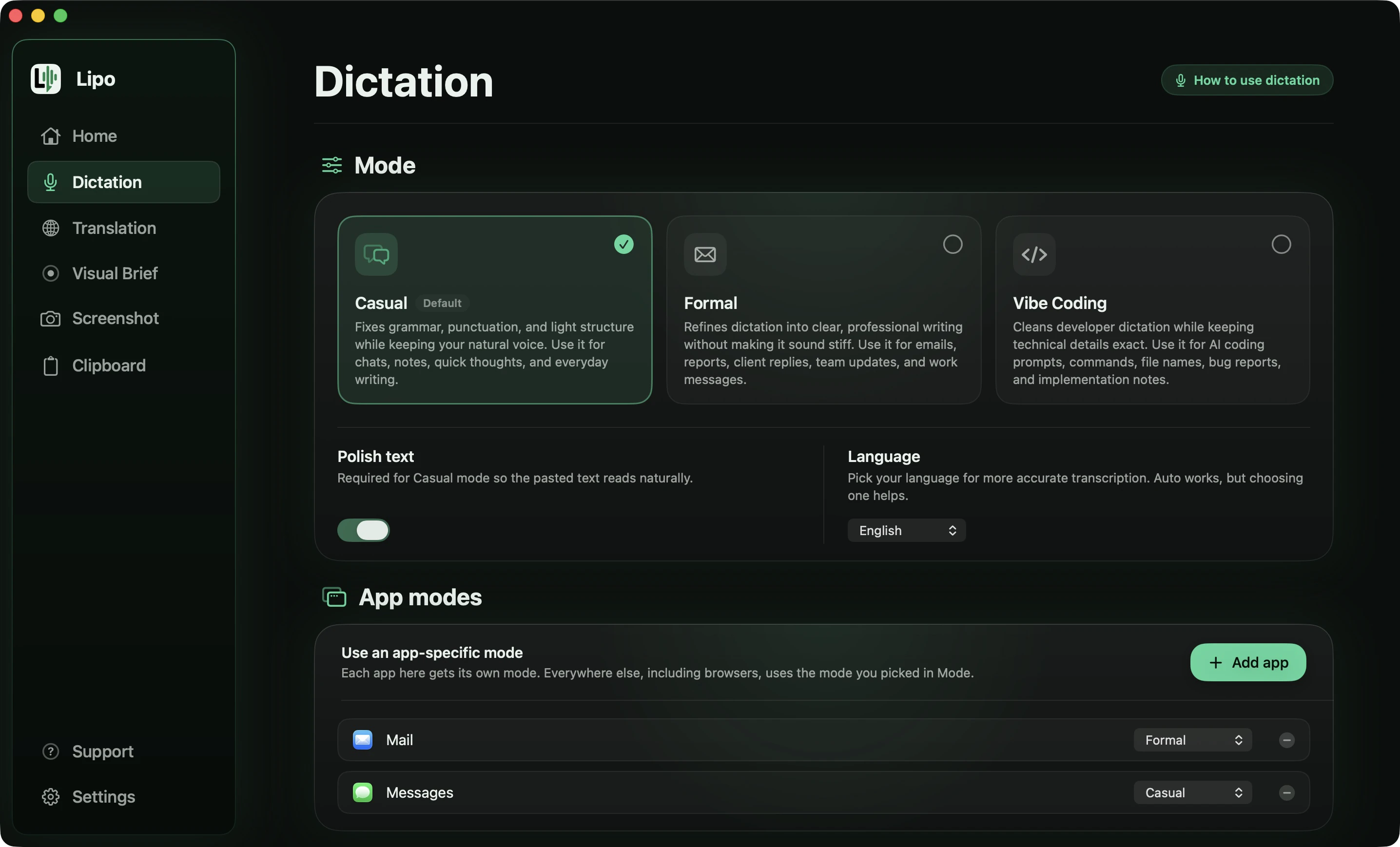
Nothing about your keyboard changes. After you install Lipo (macOS 15.2 or later), pick Spanish as the dictation language under Dictation, then Language, and allow the two permissions it asks for: the microphone, and accessibility, which lets Lipo paste into other apps. Picking Spanish works better than automatic language detection.
To dictate, hold the right Option key while you speak and release it when you finish. Lipo records only while the key is down. Then it transcribes the Spanish, removes filler words and false starts (words you begin, stop, and then say again), adds the accents and punctuation, and pastes the finished text at your cursor.
This message to a colleague about an online shop launch has six of the problems that real speech always has.
You say
"Ehh, oye, mira, la tienda... la tienda en línea la subimos el martes, no, perdón, el miércoles, porque falta el, el tema de los pagos. Ya subí las fotos, son como veinticinco. Y el descuento quedó en quince por ciento, no en veinte. Avísale a Caro que el archivo nuevo se llama catalogo punto pdf, o sea el nuevo, no el viejo, porfa."
Lipo pastes
Oye, mira, la tienda en línea la subimos el miércoles, no el martes, porque falta el tema de los pagos. Ya subí las fotos, son como 25. El descuento quedó en 15%, no en 20%. Avísale a Caro que el archivo nuevo se llama catalogo.pdf, no el viejo, porfa.
Six things happened there:
- The correction was kept, not the first answer. You said Tuesday, stopped, and said Wednesday. The message says Wednesday.
- The stutter is gone. "la tienda... la tienda" and "el, el tema" are each written once.
- Filler is gone. "Ehh", "perdón" and "o sea" do not appear.
- Numbers are written as digits. "veinticinco" became 25, "quince por ciento" became 15%. Lipo never changes the value of a number, only how it is written.
- A spoken symbol became the symbol. "catalogo punto pdf" became catalogo.pdf, because you were clearly saying a file name.
- Your Spanish stayed yours. "Oye", "mira", "avísale" and "porfa" are all still there. Casual mode fixes the writing, not the way you talk.
For a long email, switch to Toggle mode in settings. Press the shortcut key once to start and again to stop.
Does Lipo get tú, usted and vos right?
Casual mode keeps whatever you spoke, and Formal mode moves the text toward usted. One afternoon can include a WhatsApp message to your sister ("mandame la foto") and an email to a client ("le agradecería que me enviara la factura"). In Casual mode, Lipo fixes accents and punctuation and leaves your tú, your vos and your regional words alone. In Formal mode, Lipo rewrites the text in a professional style. You say "porfa mandame el reporte de la junta", and Lipo writes: Por favor, envíeme el informe de la reunión. Pin Formal to Mail and Casual to WhatsApp Desktop, and the same key gives you the right register in each app.
Lipo works best with standard Spanish. A regional accent usually works too, but strong dialect words may not always come out exactly as you said them. If a sentence comes out wrong, tell us.
"Tengo un meeting con el team a las tres, después te hago un call" is normal Spanglish in Miami and San Antonio. Dictation that listens for one language hears "meeting" and either drops it or writes the nearest Spanish sound. Lipo recognizes both languages in the same sentence and writes the English words as English. The guide to dictating in multiple languages explains how this works.
Speak Spanish, paste English
Many Spanish speakers write English all day, to a manager, a client or a university. You think of the sentence in Spanish, translate it in your head, and then type English. Lipo removes the middle step.
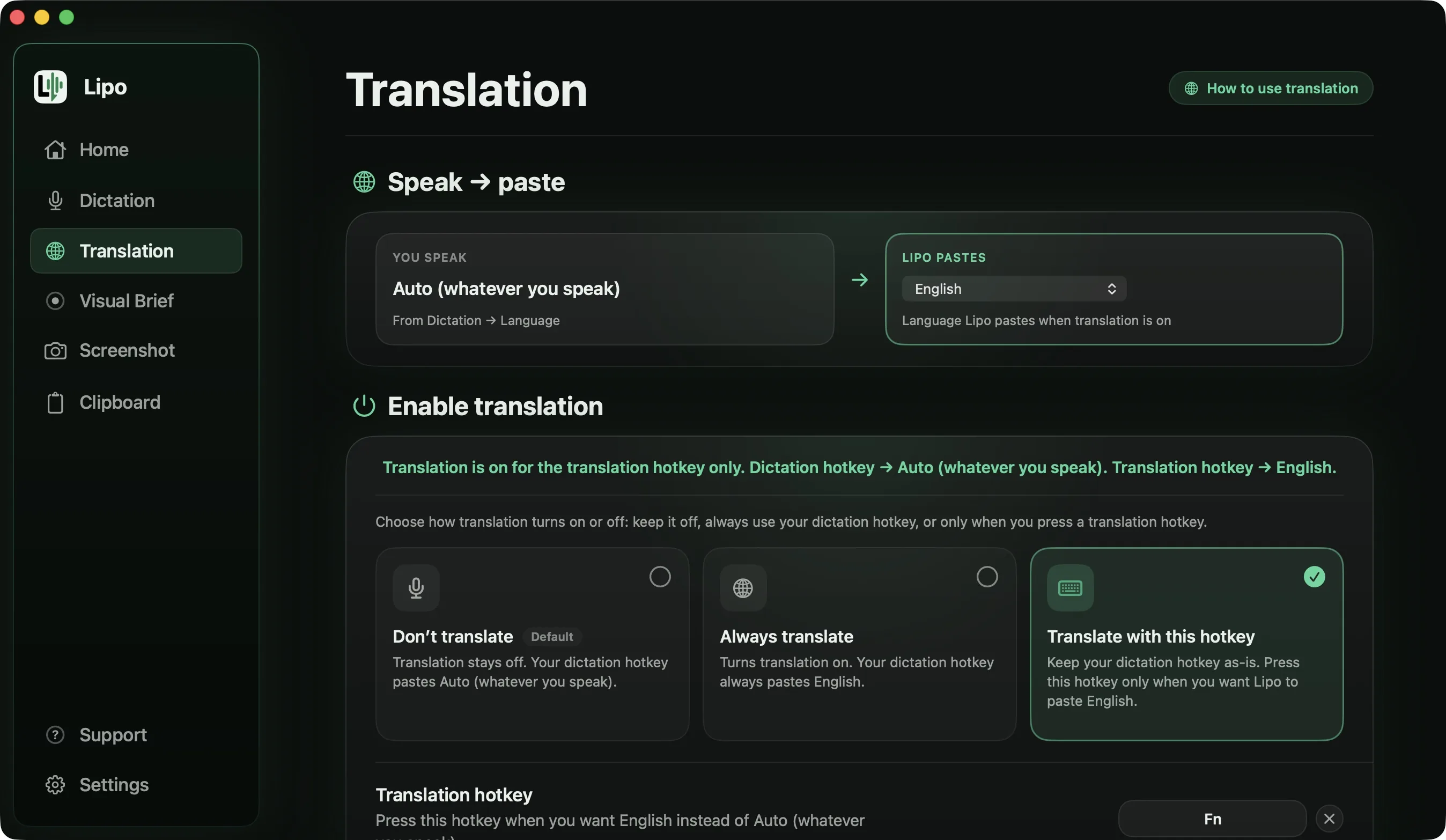
Turn it on in the Translation tab by setting "Lipo pastes" to English. Then decide whether every dictation is translated, or whether a second key gives you English while your normal key stays in Spanish. Lipo always cleans up the Spanish first, because translating "o sea" and "este" produces fluent English that says nothing.
In Spanish you know when to write "un abrazo" and when to write "saludos cordiales". In a second language that sense of tone is the first thing to go, because grammar takes all your attention. When you speak Spanish and Lipo translates it, the meaning and the tone stay.
Here is a whole email, spoken the way people actually speak one.
You say (Spanish, Formal mode, output language set to English)
"Hola Andrea, eh, mira, te escribo por lo del reporte. Este... no vamos a llegar al viernes, o sea, necesitamos hasta el lunes, porque nos falta información de dos áreas. Lo que falta es, primero, los números de septiembre, segundo, las fotos de la bodega, y por último la firma de Legal. En cuanto tenga eso te lo mando el mismo día, ¿va?"
Lipo pastes
Hi Andrea,
I am writing about the report. We will not make Friday and need until Monday, because we are still missing information from two areas:
1. The September figures
2. The warehouse photos
3. The sign-off from Legal
As soon as I have those, I will send it to you the same day.
"Hola Andrea" became "Hi Andrea," because you said it. Nothing was added at the top or the bottom, so there is no subject line and no "Best regards" that you never spoke. "Primero, segundo, y por último" became a numbered list, and the marker words themselves disappeared. "Eh", "este", "o sea" and "¿va?" are gone, and "no vamos a llegar" became "we will not make", because Formal mode writes out contractions.
The 1, 2 and 3 are typed characters, not formatting, so the list stays a list in Slack or WhatsApp.
It also works in reverse. Set "Lipo pastes" to Spanish, speak English, and Lipo pastes Spanish with the accents and the ¿ in place. The translation docs cover every setting, and translation is included in every plan.
Spelling of names is the other common problem. If she spells it "Ximena", not "Jimena", add that spelling to the dictionary, and Lipo uses it in Spanish, in English and after translation. The same list can hold "fecha límite" if you would rather not see "deadline".
Is Wispr Flow better for Spanish?
For plain Spanish recognition, Wispr Flow is strong, and it says so. Spanish is in its top group of seven languages, the ones it calls "trained and tuned to match English-level performance". Aqua Voice also lists Spanish. Willow Voice claims more than 100 languages without a list, superwhisper depends on the model you choose, and Apple's dictation is free and adds punctuation in four of its five Spanish versions.
The differences are elsewhere. Wispr Flow's help centre says each recording is written in one language, so "un meeting con el team" is the risky sentence there, while Lipo writes it the way you said it. Translation is the second difference: Lipo works between any two of its 50+ languages, superwhisper only into English, and the others not at all. The comparison of dictation apps for non-English languages has the full table.
How to get better results in Spanish
Say whole sentences. Whether "que" needs an accent depends on the sentence around it, and Lipo can only judge that when it hears the sentence.
Ask questions with a question's rise in your voice instead of saying "signo de interrogación". Lipo writes the ¿ and the ? from that.
"El lunes, no, el martes" is fine to say. Lipo keeps the day you settled on.
If you mix in English often, set the language to Spanish rather than automatic detection, so Lipo knows which language the sentence is built on.
Soft "s" sounds are the first thing wireless earbuds lose, so the Mac's microphone or a wired headset gives better accents.
Frequently asked questions
Can I voice type in Spanish on a Mac?
Yes. Apple's built-in dictation supports Spanish for free. Apps like Lipo add automatic accents, ¿ and ¡, filler removal, register control and translation.
How do I turn on Spanish dictation on a Mac?
Go to System Settings, then Keyboard, and switch Dictation on. Click Edit beside Languages, tick Spanish and pick your country's version. The dictation shortcut then works in any text box.
Does Apple dictation add punctuation in Spanish?
Yes, for Spain, Mexico, Colombia and the United States: commas, periods and question marks. Chile is not on Apple's list, and Apple does not say whether the opening ¿ and ¡ are included.
Does Lipo add accent marks and ñ correctly?
Yes. Lipo writes accents (está, sí, qué, también) and ñ by default, based on the meaning of the whole sentence.
Does it add the inverted question mark?
Yes. Say a question with question intonation, and Lipo writes ¿ at the start and ? at the end.
Can I choose tú or usted?
Casual mode keeps whatever you spoke, including vos. Formal mode rewrites the text toward usted and professional phrasing. You can pin a mode to an app.
Does Lipo understand regional Spanish accents?
Lipo works best with standard Spanish. A regional accent usually works too, but strong dialect words may not always come out exactly as you said them. In Casual mode, Lipo keeps voseo instead of correcting it.
Can I mix Spanish and English (Spanglish)?
Yes. Lipo recognizes both languages in one sentence and writes each word in its own language. "Tengo un meeting a las tres" comes out as spoken.
Can I speak Spanish and get English text, or the reverse?
Both. Set "Lipo pastes" to English or Spanish in the Translation tab. Lipo transcribes, cleans up, translates, and then pastes. Translation is included in every plan.
Keep reading
From the docs: Dictation modes · Your Dictionary