 Lipo
LipoVoice input in Claude Code and Cursor, in your own language
The prompt in your head is not in English, but the code words inside it are. Here is how to speak a prompt in your own language and paste clean English into Claude Code or Cursor.
You can speak your prompts to Claude Code and Cursor, and both now have their own voice input. Claude Code's /voice command understands 20 languages, and Cursor 2.0 added Voice Mode for its Agent. Neither one translates, and Claude Code's list leaves out Bangla, Urdu, Arabic, Tamil and Chinese. Lipo is our app for those gaps. It pastes into Claude Code, Cursor, Windsurf, Copilot Chat or ChatGPT, keeps function and library names exactly as you said them, and can turn a spoken Hindi, Bangla, Spanish or Arabic prompt into English before pasting it. Speaking a prompt like this is voice typing, which many developers call voice dictation.
Here is how Lipo works. You hold the hotkey (a key you press to start recording; the default is the right Option key) and speak. When you release the key, Lipo transcribes your speech (turns it into text). Then Lipo cleans the text. It removes filler words (sounds like "um" and "so") and false starts (a sentence you began and then changed). It adds punctuation and fixes small mistakes. Then Lipo pastes the finished text where your cursor is (the blinking mark that shows where text will go). Lipo does not type letter by letter and it does not show text while you speak.
When developers type a prompt in their second language, the prompt becomes shorter and less clear, and the AI tool gives a worse answer.
Does Claude Code have a voice mode?
Yes. Claude Code has built-in voice dictation in the terminal and in its VS Code extension. Anthropic's voice dictation docs describe how it works:
- Run
/voicein Claude Code. The first time, macOS asks to give your terminal microphone access. - Hold the Space bar while you speak, and release it to insert the text. Your words appear in the prompt as you talk.
- Press Enter to send, or switch to tap mode with
/voice tap, where one tap starts recording and a second tap sends the prompt.
It needs a Claude.ai sign-in. It does not work when Claude Code runs on an API key, Amazon Bedrock, Google Cloud or Microsoft Foundry, and it does not work over SSH or in cloud sessions. The audio goes to Anthropic's servers for transcription, and Anthropic says it does not count against your Claude usage.
Dictation follows Claude Code's language setting, which you change in /config. The supported languages are Czech, Danish, Dutch, English, French, German, Greek, Hindi, Indonesian, Italian, Japanese, Korean, Norwegian, Polish, Portuguese, Russian, Spanish, Swedish, Turkish and Ukrainian. If your language is not on that list, dictation falls back to English. It writes what you said in the language you set and does not translate it.
Claude Code voice mode not working?
Anthropic's troubleshooting list covers the common cases:
- "Unknown command: /voice" means you are not signed in with a Claude.ai account, or an API key is set and takes priority. Run
/login, or remove the key and restart. - "Microphone access is denied" means your terminal app has no microphone permission. Turn it on in System Settings, Privacy & Security, Microphone, then run
/voiceagain. - Text in the wrong language usually means the dictation language is still English. Set your language in
/config.
Does Cursor have voice input?
Yes. Cursor's 2.0 changelog added Voice Mode: "Control Agent with your voice using built-in speech-to-text conversion." You can also set submit keywords that start the Agent when you say them. The changelog does not list the languages it supports.
When is a separate dictation app worth it?
The built-in options cover English and the languages on their lists, inside one tool. A separate app like Lipo helps in three cases:
- Your language is not on the list. Claude Code's
/voicehas no Bangla, Urdu, Arabic, Tamil or Chinese. Lipo supports all of them. - You want to speak your language and send English. Neither built-in option translates. Lipo can.
- You work in more than one tool. Lipo pastes into any text field, so the same key works in Claude Code, Cursor, ChatGPT, Slack and your email.
Why are spoken prompts better than typed ones for coding?
You can describe a bug in 40 seconds of speech. Typing the same description would take five minutes, so you type "fix the auth bug" instead.
Claude Code and Cursor give better answers when you give them more context. Context means which file, what you expected, what happened instead, and what you already tried. Typing 150 words feels like writing an email. Speaking 150 words takes less than one minute.
Why do English-only voice tools fail non-English developers?
The prompt you would speak is not in English. The parts that are in English are the technical words, and those are the words speech tools get wrong most often.
A developer in Pune describes a bug in Hindi.
You say
"useEffect में dependency array गलत है, इसलिए हर render पे API call जा रही है."
A voice tool set to English hears the Hindi as noise and guesses. A voice tool set to Hindi writes "useEffect" the way it sounds in Hindi. Now the prompt contains an invented name, and the AI tool will search your code for it.
Translation is the second problem. Dictation apps made for developers do not translate. If you speak Spanish into them, you get Spanish text in Cursor's chat box. Claude Code accepts a Spanish prompt, but its tools, documentation and commit messages are in English, and English prompts usually get better results.
How to set up Lipo for Claude Code and Cursor
Setup takes about ten minutes.
- Install Lipo (macOS 15.2 or later) from uselipo.com. There is a free trial. Choose your spoken language under Dictation, then Language. Lipo can also auto-detect the language (guess it from your speech). A Hindi sentence full of English code words is hard to detect, so choose the language yourself.
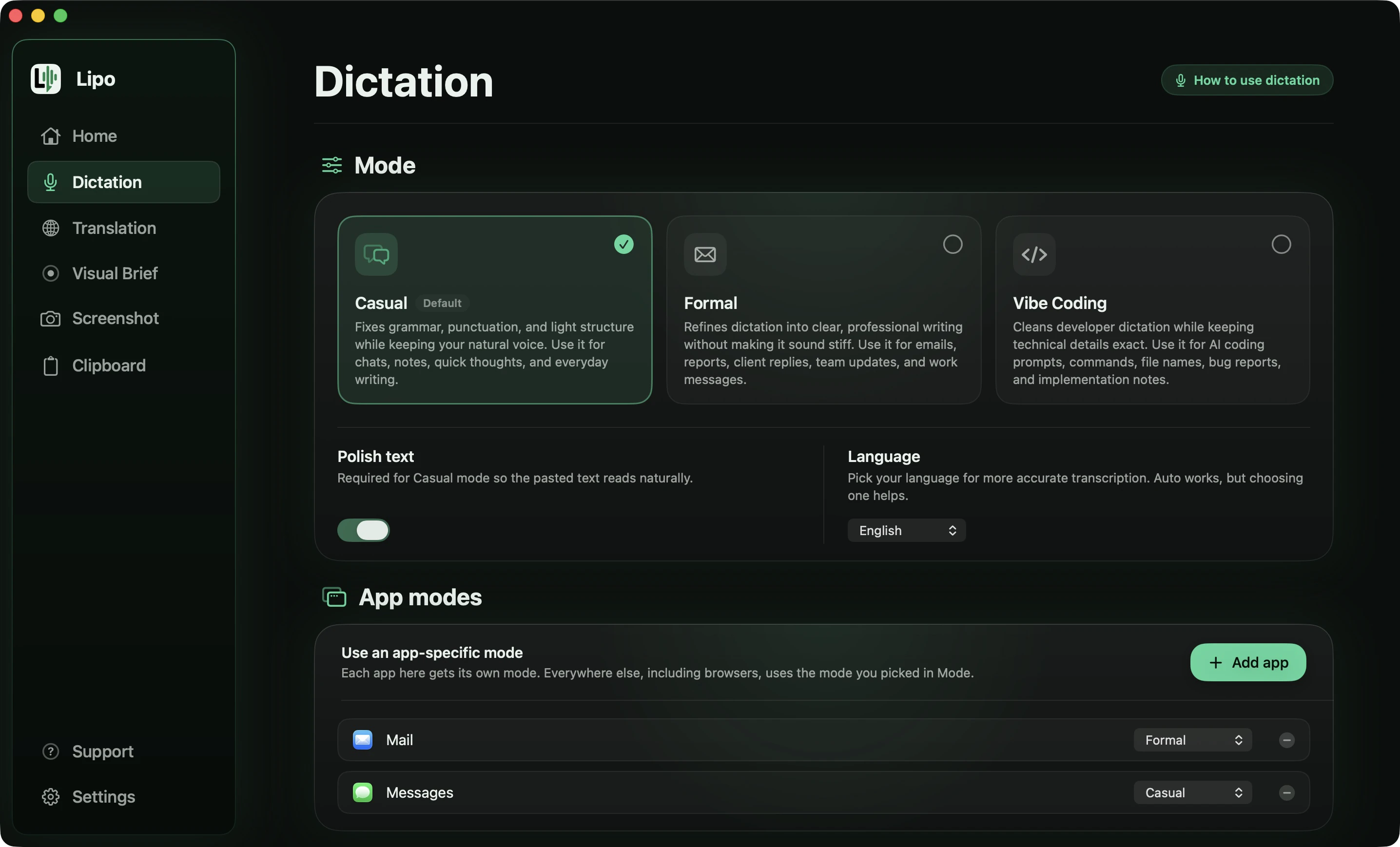
- Open Dictation modes and look at Vibe Coding. This mode keeps technical words exact and does no cleanup by default, so Lipo does not rewrite your phrasing. It comes with a preset word list (Cursor, SwiftUI, TypeScript, npm, Xcode).
- Use App modes to pin Vibe Coding to Cursor and to your terminal app (Terminal, iTerm2, Warp or Ghostty).
With translation on, Lipo transcribes, then cleans the text, then translates the cleaned text, then pastes it. Raw speech about code is full of false starts, such as "no wait, not the hook, the reducer". A translator that sees the raw version translates the mistake together with the fix.
Claude Code specifics
Claude Code runs in a terminal, and Lipo pastes into any terminal text input. Put your cursor on the prompt line, hold the hotkey, speak and release.
For a long prompt, switch Lipo to Toggle mode in settings. In Toggle mode you press the hotkey once to start and once to stop, so you do not hold a key while you think. Also remember that in a terminal, Return sends the prompt. Toggle mode lets you end a dictation with Return, but here that would send a half-finished prompt. Stop with the hotkey instead, read the pasted text, then press Return yourself. Press Esc to cancel a dictation you do not want to send.
Cursor specifics
Cursor has two places for prompts. Cmd+L opens the chat panel, for long prompts and requests across many files. Cmd+K opens inline edit, a one-line box above the code you selected.
Toggle mode fits the chat panel. Hold-to-talk fits Cmd+K. Select a function, press Cmd+K, hold the hotkey, and say "extract the validation into its own function and return early on null". Release the key and press Enter. Windsurf's Cascade panel and Copilot Chat in VS Code work the same way. Lipo only checks which mode you pinned to the app that owns the text field (the box where you type).
What does a translated prompt look like?
Here are four prompts spoken into Cursor's chat, each in a different language, each with the filler and false starts real speech has. All four are Vibe Coding mode with the output language set to English.
You say
"अच्छा तो, ये जो login page है ना, उसपे user login करता है तो, मतलब पहली बार तो ठीक है, लेकिन refresh करने पे 401 आ रहा है। मुझे लगता है useEffect में... नहीं, useEffect नहीं, वो जो Supabase का session वाला call है, वो shuru में ही चल रहा है token आने से पहले। इसको fix करो, और, और एक test भी लिख दो इसके लिए।"
Lipo pastes
On the login page, the first login works, but refreshing the page returns a 401. I think the Supabase session call is running before the token is available, rather than a useEffect problem. Fix this and add a test for it.
You say
"Então, essa lista de pedidos tá demorando muito pra carregar, tipo uns cinco segundos. Eu acho que é o... é o loop que faz uma query pra cada pedido, sabe? Um N mais um clássico. Dá pra trocar por um join só? E coloca um índice na coluna created_at também."
Lipo pastes
The orders list is taking about five seconds to load. I think the loop is running one query per order, a classic N+1. Could you replace it with a single join, and add an index on the created_at column as well?
You say
"ইয়ে, ওই testটা CI তে fail করতেছে কিন্তু আমার laptop এ pass করে। আমার মনে হয় timezone এর ব্যাপার, মানে server UTC তে চলে আর আমার machine এ Dhaka time। date compare করার জায়গাটা একটু দেখো তো।"
Lipo pastes
The test fails in CI but passes on my laptop. I think it is a timezone problem: the server runs in UTC and my machine is on Dhaka time. Could you look at where the dates are compared?
You say
"طيب، الفورم هذا، لما المستخدم يحط إيميل غلط ما تطلع أي رسالة خطأ، بس الزر يصير disabled. أبي رسالة واضحة تحت الحقل، ولا... لا تغير شكل الزر. وخلي الvalidation يشتغل لما يطلع من الحقل، مو مع كل حرف."
Lipo pastes
On this form, when the user enters an invalid email no error message appears; the button just becomes disabled. I want a clear message under the field instead, and do not change the button. Run the validation when the field loses focus, not on every keystroke.
The same thing happens in all four. The spoken language is translated, and the code words are not: "useEffect", "401", "Supabase", "N+1", "created_at", "CI", "UTC" and "validation" come through exactly as said, because a translated identifier is an identifier the AI cannot find. The false starts go, and the correction each one points at is kept, so the Hindi prompt still carries the real theory about the cause rather than the one the speaker abandoned. Typed in English by someone in a hurry, this prompt would have been "login breaks on refresh, 401, fix it", and the AI would have had to guess the rest.
Here is a Spanish one, for Cursor's inline edit, with the hotkey held instead of toggled.
You say (Spanish, Cmd+K with a function selected)
"Este handler, eh, hazlo async y que... que devuelva un Result en vez de tirar la excepción. Usa el tipo ApiError que ya tenemos, no crees uno nuevo. Y el timeout ponelo en treinta segundos, no en diez. El archivo se llama api guion bajo client punto ts, por si lo necesitás."
Lipo pastes
Make this handler async and have it return a Result instead of throwing. Use the existing ApiError type, do not create a new one. Set the timeout to 30 seconds, not 10. The file is api_client.ts if you need it.
Four things worth noticing. "ApiError" kept its exact capital letters because it is in the dictionary; without that entry a speech tool writes "API error", and Cursor then hunts for a type that does not exist. The spoken numbers became digits and the correction was kept, so the timeout is 30 and not 10. "Api guion bajo client punto ts" became api_client.ts, because spoken symbols turn into real symbols when the surrounding words are clearly a file name. And "eh" and the false start are gone.
One thing to know before you copy this setup. Vibe Coding does no cleanup by default, which is the point: your phrasing reaches the AI untouched. The tidying in these two examples comes from the translation step, which always rewrites as it converts. If you dictate in English with translation off, you get your words as spoken, filler included. Turn on Polish text for Vibe Coding in the Dictation tab if you want the cleanup without the translation. Each mode keeps its own setting, so this does not change Casual or Formal.
Lipo is not perfect. Some very short names sound like ordinary words, such as a variable called "data" inside a Hindi sentence. Lipo sometimes translates such a name when it should stay, and a dictionary entry fixes most of these cases.
Show the bug instead of explaining it
Some bugs take ten seconds to show and ten minutes to describe. A layout that is slightly wrong is one example. The guide to turning a screen recording into a prompt covers this in more detail.
Claude Code and Cursor take text and images, but not a screen recording. Lipo's Visual Brief lets you record your screen while you describe the problem in your language. Start it from the menu bar icon and record your full screen or one window for up to 5 minutes. When you stop, Lipo transcribes what you said and analyzes the recording. Then Lipo writes a structured prompt and pastes it into Claude Code's terminal or Cursor's chat. Visual Brief is in beta. It needs the Screen Recording permission (a system setting that allows an app to record your screen). Lipo deletes the recordings from your computer after 7 days.
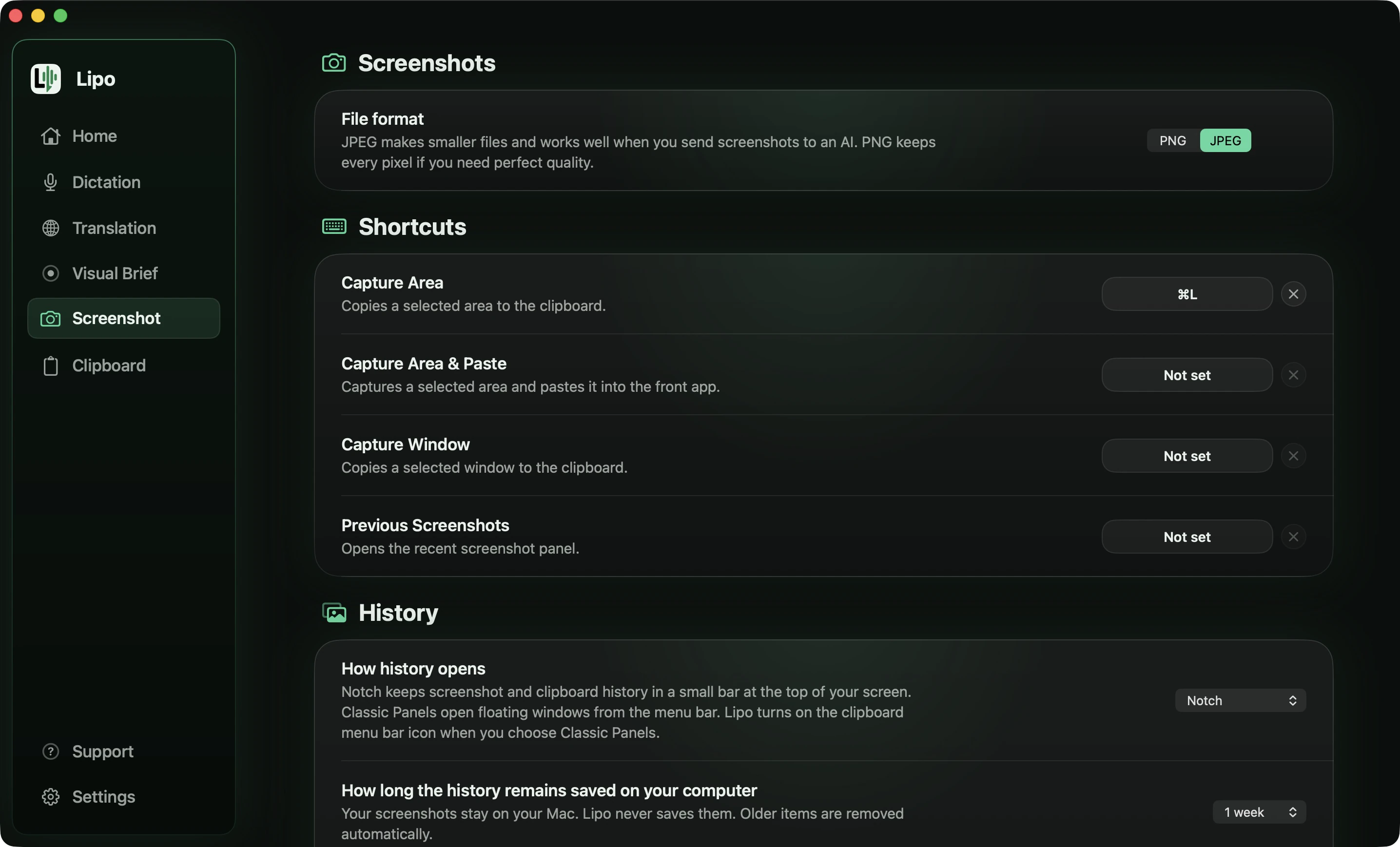
For smaller things, use the screenshot button. While you are recording, Lipo shows a small floating window, which Lipo calls the pill. Click the screenshot button on the pill, capture the error, and keep speaking. When you release the hotkey, Lipo pastes your text and attaches the screenshot to the same message. Before that, the screenshot editor lets you blur an API key. Screenshots also need the Screen Recording permission.
What about Wispr Flow and other dictation apps for coding?
All of them can dictate into Cursor and the terminal, because they paste into any text field. The differences are language and translation. Wispr Flow's help centre says it detects one language per dictation, so a Bangla or Arabic prompt full of English code words comes out unpredictably. Wispr has been testing a Hinglish model since early 2026, which may help Hindi speakers. For translation, Lipo works between any two of its 50+ languages, superwhisper translates into English only, and the others do not translate what you dictate. The comparison of dictation apps for non-English languages has the full table.
Is it safe to dictate about code?
Lipo stores your dictation history on your computer, not on our servers. Transcription and cleanup use cloud processing, so your audio and text pass through our providers during the request. Our privacy policy says what is sent and what is kept. Do not dictate a secret that you would not paste into Claude Code or Cursor. If a prompt needs a live API key, type that part.
Frequently asked questions
Does Claude Code have voice mode?
Yes. Run /voice in the Claude Code terminal or VS Code extension, then hold the Space bar while you speak. It needs a Claude.ai sign-in, supports 20 languages, and does not translate.
Which languages does Claude Code voice dictation support?
Czech, Danish, Dutch, English, French, German, Greek, Hindi, Indonesian, Italian, Japanese, Korean, Norwegian, Polish, Portuguese, Russian, Spanish, Swedish, Turkish and Ukrainian. Other languages fall back to English.
Why is /voice not working in Claude Code?
The usual causes are a missing Claude.ai sign-in (an API key takes priority over it), no microphone permission for your terminal, or the dictation language still set to English. Anthropic's voice dictation docs list each error message and its fix.
Can I use a dictation app in Claude Code instead?
Yes. Claude Code runs in a terminal, and Lipo pastes into any terminal text input. Put the cursor on the prompt line, hold the hotkey (or use Toggle mode for long prompts), speak, and release. Lipo pastes the text. Press Return yourself to send it.
Does voice to text work in Cursor's chat and inline edit?
Yes, in both. The Cmd+L chat panel suits Toggle mode for long prompts. The Cmd+K inline edit box suits hold-to-talk for one-line instructions. Pin Vibe Coding mode to Cursor so technical words stay exact.
Can I speak Hindi or Bangla and get an English prompt?
Yes. Set "Lipo pastes" to English in the Translation tab and choose a separate translation hotkey. Lipo transcribes, cleans, then translates, and keeps names like useEffect and Supabase unchanged.
Will it get function names and library names wrong?
Vibe Coding mode keeps technical words as you said them and comes with a preset word list. Add your project's names to the custom dictionary. Lipo then uses your spelling in every language and after translation.
What is Vibe Coding mode?
It is Lipo's dictation mode for code editors and AI coding tools. It keeps technical words exact and does no cleanup by default, so Lipo does not rewrite your phrasing. It comes with a preset word list, and you can pin it to specific apps.
Can I attach a screenshot of the bug to my prompt?
Yes. Click the screenshot button on the floating pill while you record, capture the error, and keep speaking. When you release the hotkey, Lipo attaches the screenshot to the same message. For longer bugs, Visual Brief records your screen and writes a structured prompt from your description.
Is dictating code prompts private?
Dictation history stays on your computer. Transcription and cleanup use cloud processing. Do not dictate secrets that you would not paste into an AI tool. Type those parts instead.
Keep reading
From the docs: Dictation modes · Visual Brief